

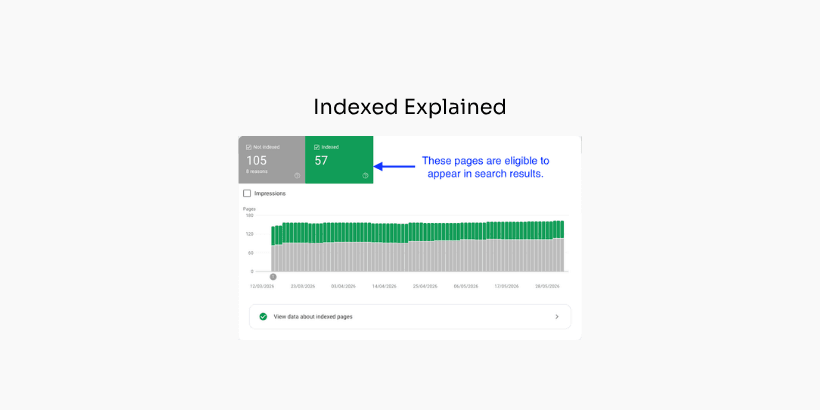
Most SEO teams treat "indexed" as a finish line.
The page is in Google. Job done.
But "indexed" isn't a finish line. It's a status that can change tomorrow, often without warning. And the word itself promises far less than people assume.
In this article, I'll explain what "indexed" actually means in Google Search Console, the three things it does NOT mean, and why you should treat it as a dynamic status, rather than a fixed status.
I'll back it up with examples and data from Indexing Insight.
So, let's dive in.
Google index status is a binary statement.
An indexed page in Google Search Console > Indexing > Pages report may be eligible to appear in Search results.
The important word is eligible. It's binary because it is a status about a page URL:
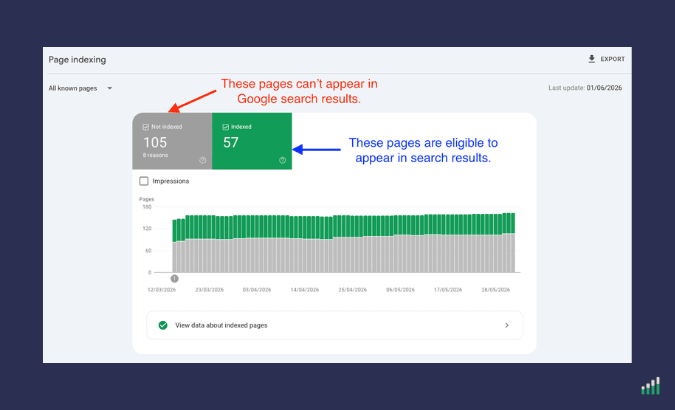
This official definition is given in Google Search Indexing and Ranking FAQ:
Once a page is indexed, it becomes eligible to show up in Google Search results and other Google services, like Discover.
Indexed status tells you one binary thing about each URL: can this page show up in Search, yes or no.
It does NOT tell you whether the page will show up, where it will rank, or how often it gets served. Just that it CAN appear in search results.
Google says it plainly in its help documentation:
"URL is on Google" doesn't guarantee that your page is appearing in Search results.
Eligibility is key to appear in search results but not a guarantee a page will appear.
The index state of your page isn't fixed.
There are two processes which decide if your website's pages are eligible to appear in Google's search results:
The indexing pipeline is a series of systems which decide if a page is indexed.
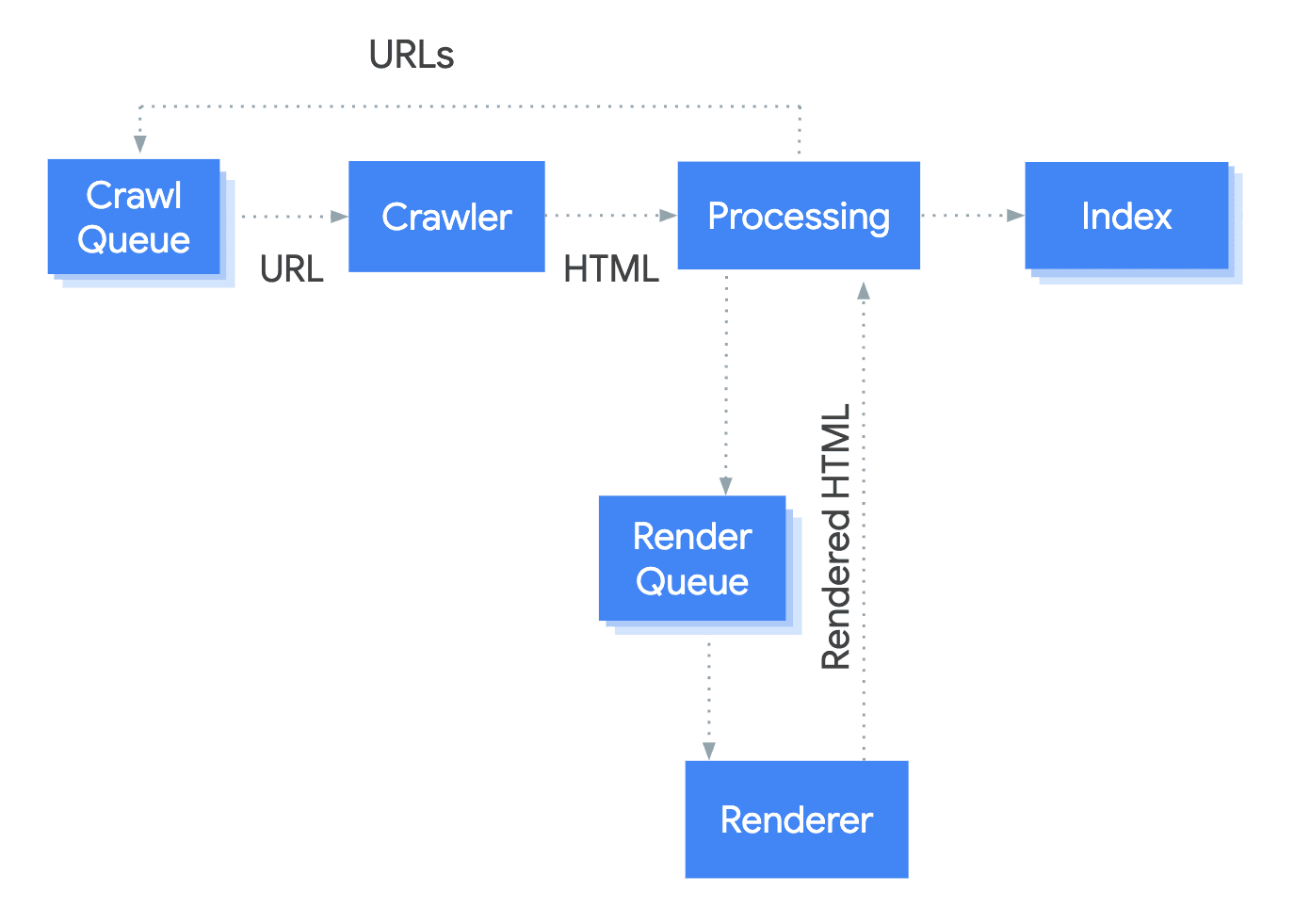
Most people picture indexing as a single switch: Google crawls a page, then it's "in" or it's "out." The reality is far more complex.
As Google's Martin Splitt has explained in an interview, the indexing pipeline is:
"...a system composed of many smaller systems running sometimes in sequence, sometimes in parallel."
It was historically known internally as Caffeine, though Google hasn't called it that for years. Before anything reaches the indexing pipeline, Googlebot has already done a lot of work.
By the time content enters the pipeline, Googlebot has:
Here's the part most people miss: the moment Googlebot records that HTTP response, two things happen at the same time.
The response is handed to the indexing pipeline, and the discovered URLs are passed to the Dispatcher for future crawling. Indexing and URL discovery are parallel systems feeding off the same fetch.
When a HTTP response from a page is fetched and downloaded it is sent to the indexing pipeline. And it's here that there are 5 broad microservices which work in parallel:
After everything above, Google decides whether to actually index the page.
The 2nd process which decides if an existing indexed page stays indexed.
Google does not keep every page it finds. It actively removes pages from its index, and most SEO teams never notice until the organic traffic disappears.
This is not a conspiracy theory.
It is documented behaviour, confirmed by Googlers, visible in first-party indexing data, and described in detail in a Google patent called "Managing URLs" (US7509315B1).
The patent gives us a working model for how a search engine decides which URLs to keep, which to crawl, and which to quietly drop.
The idea that Google deletes indexed pages is not new, but it is easy to miss.
Gary Illyes has said in interviews that when the volume of "crawled but not indexed" URLs is high, it can point to a general site quality problem:
“And in general, also the the general quality of the site, that can matter a lot of how many of these crawled but not indexed, you see in Search Console. If the number of these URLs is very high that could hint at a general quality issues. And I've seen that a lot uh since February, where suddenly we just decided that we are de-indexing a vast amount of URLs on a site just because the perception, or our perception of the site has changed.” - Source: Search Engine Roundtable.
Martin Splitt has made the same point in a Google video:
“The other far more common reason for pages staying in "Discovered-- currently not indexed" is quality, though. When Google Search notices a pattern of low-quality or thin content on pages, they might be removed from the index and might stay in Discovered.” - Source: Help! Google Search isn't indexing my pages
At Indexing Insight, our data shows the same thing happening in the wild.
At Indexing Insight, our 'crawled - currently not indexed' research identified that nearly 80% of Not Indexed pages with this index coverage state are actively removed indexed pages.
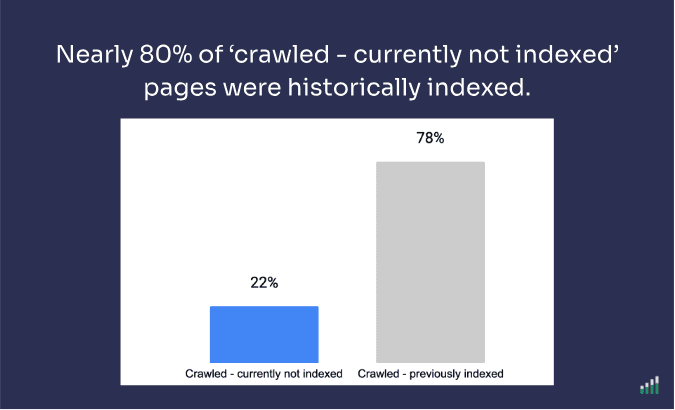
The active removal of Indexed pages is so prevalent in Google's index that we created a new report called: 'Crawled - previously indexed'.
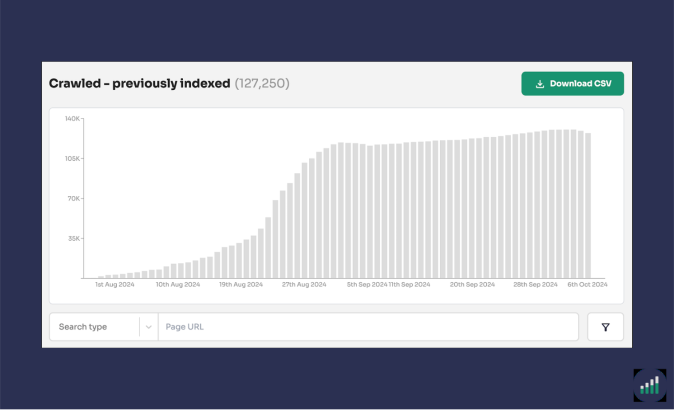
This new index coverage state helps customers identify indexed pages that are actively being removed from Google Search results.
So the question is not whether Google removes pages. It is how it decides. That is where the patent helps.
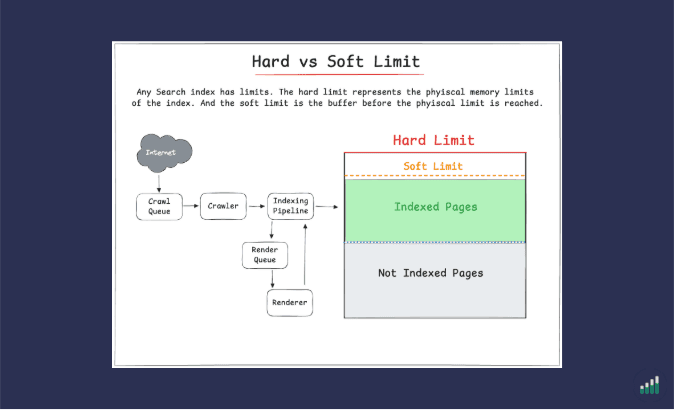
The patent highlights that any search index has limits.
According to the ‘Managing URLs’ patent (US7509315B1), the system works with two limits to manage indexed pages:
Here's the important part about the patent:
Hitting the soft limit does not stop crawling. The system keeps discovering pages, but it only indexes pages important enough to earn a place.
When we talk about importance, we're talking about a query-independent metric.
Importance reflects the page's inherent value to Google's search index rather than its relevance to any single search. It's also important to highlight that: The importance threshold is a benchmark score.
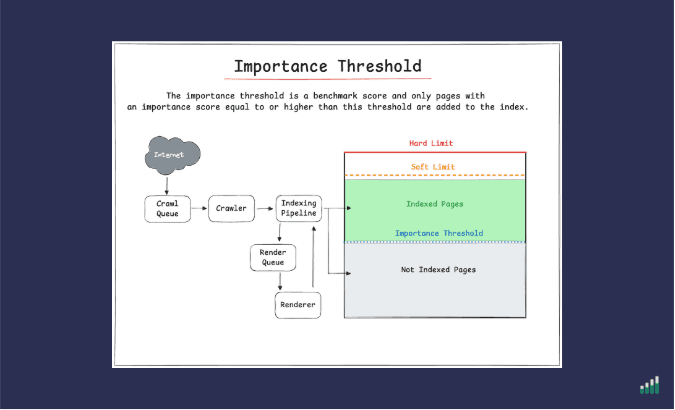
Importance Threshold vs Page Quality: In this article, 'importance threshold' and 'page quality' mean the same thing. Google employees use 'page quality threshold' to describe index management, while the patent uses 'importance threshold.'
Once the index reaches its target size, a new page only gets added if its importance rank is equal to or higher than the current threshold.
Everything below it waits. Or never gets indexed and can't appear in search results.
Your pages are not competing against an empty shelf. The patent highlights that you are competing for a finite number of slots against every other page Google knows about.
For further information check out our How Google Index Manages its Index.
As an SEO professional you need to understand that 'indexed' isn't a fixed state.
The eligibility of your pages to appear in Google search results is constantly being evaluated by two automated processes: indexing pipeline and index management.
If a page doesn't pass these two processes, then it is moved to not indexed status.
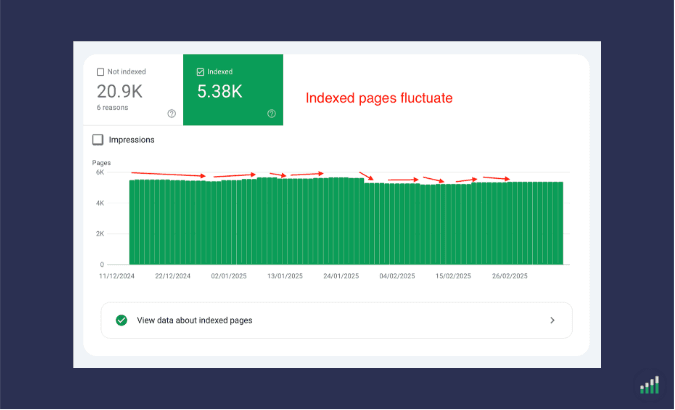
This is why you'll see fluctuations in the total number of pages being indexed in Google Search Console. Their index status is constantly changing.
So, what can you do about it as an SEO professional?
Here are four practical takeaways:
If you focus on these 4 activities your pages will be less likely to become de-indexed.
"Indexed" is a smaller, more fragile word than it looks.
It means a page is eligible to appear in Search today. Nothing more. It says nothing about ranking, nothing about visibility, and nothing about whether the page will still be indexed next month.
The teams that win at scale aren't the ones who get pages indexed once.
They're the ones who notice the moment a page stops being eligible — and act before the revenue does.

Adam Gent
SEO Product Manager and Technical SEO. I’m currently an independent consultant who works with organisations to plan, scope and execute SEO projects that drive results.
