

The Page Indexing report in Google Search Console is a fantastic free tool.
But it has limits.
The Page Indexing report updates twice a week. You can only download 1,000 sample URLs. There is no historic record of a page's index coverage state. And you have no way to know if a page that is currently not indexed was ever indexed in the first place.
For websites with 100K to 1 million pages, those limits matter. A lot.
That's why we built Indexing Insight.
In this article, I'll walk through 23 things that only Indexing Insight can do.
Some are unique features you won't find anywhere else. Others are capabilities that technically exist elsewhere but that we do faster, better, or at a scale that no other tool can match.
Let's dive in.
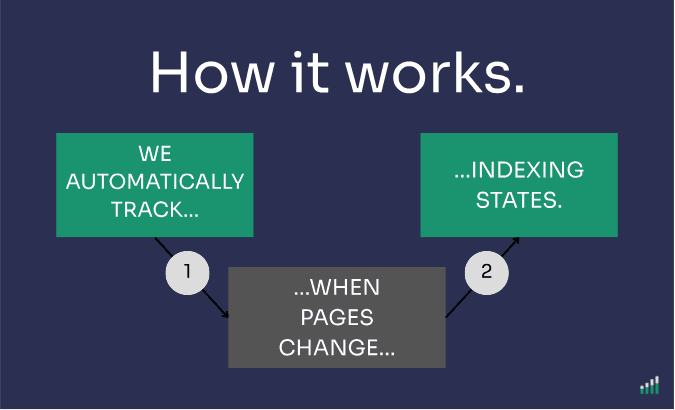
Indexing Insight automatically monitors the Google indexing state of your most important pages at scale.
Inspecting data on a daily basis.
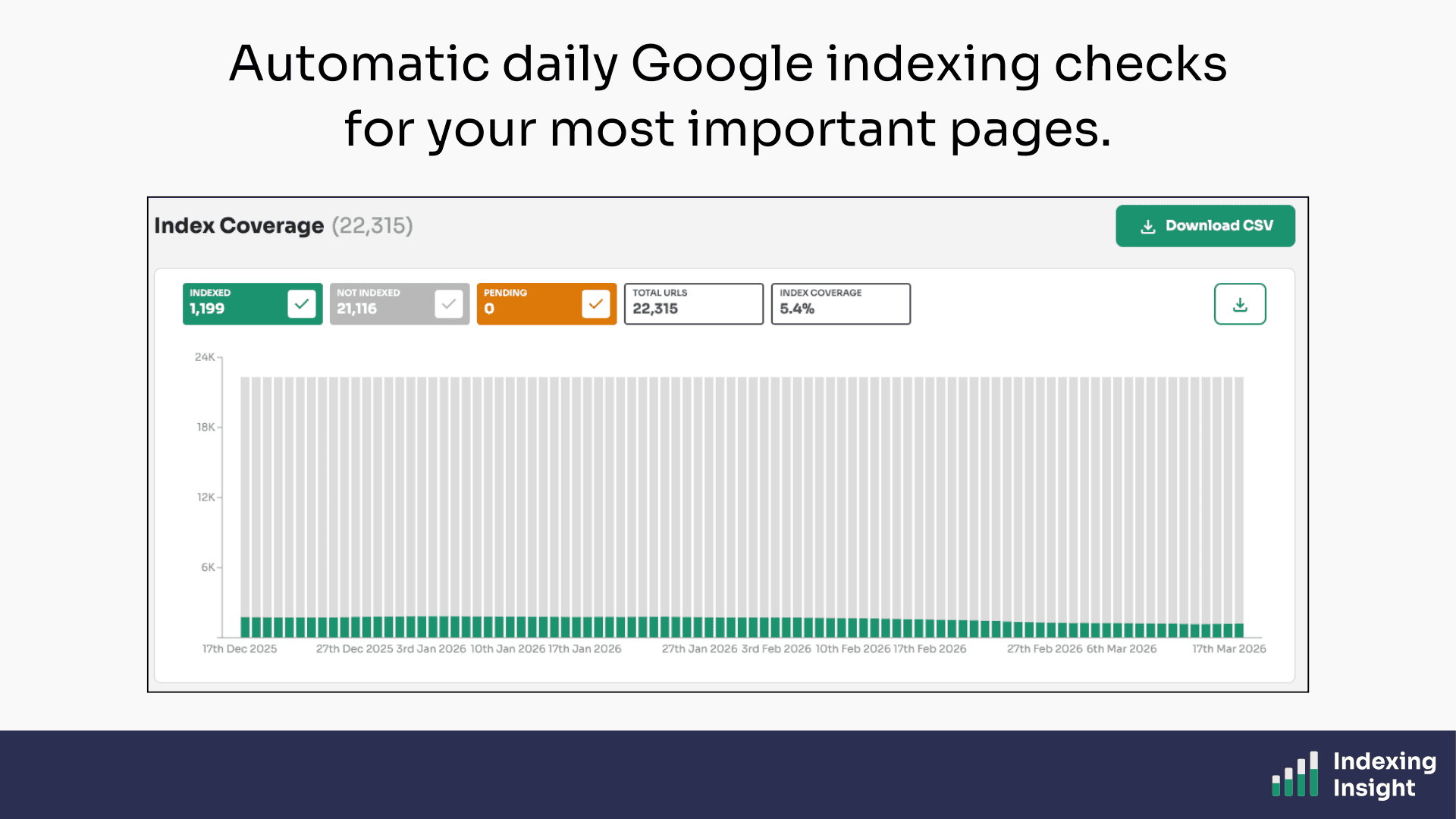
Once you've set up your project, our tool handles everything.
It checks your selected XML sitemaps for changes, inspects URLs using the URL Inspection API, and updates the indexing data every 24 hours.
No manual checks. No spreadsheets. No guesswork.
Just clean, daily indexing data straight from Google's own data warehouse all done automatically.
This is the foundation everything our data is built on.
Plans: Available to all plans.
The Google URL Inspection API has a hard limit of 2,000 requests per day per Google Search Console property.
For websites with 100K - 1 million pages, that limit is a serious problem.
Indexing Insight solves this by using multiple web properties across your website's folder structure. As well as maximising the API limits.
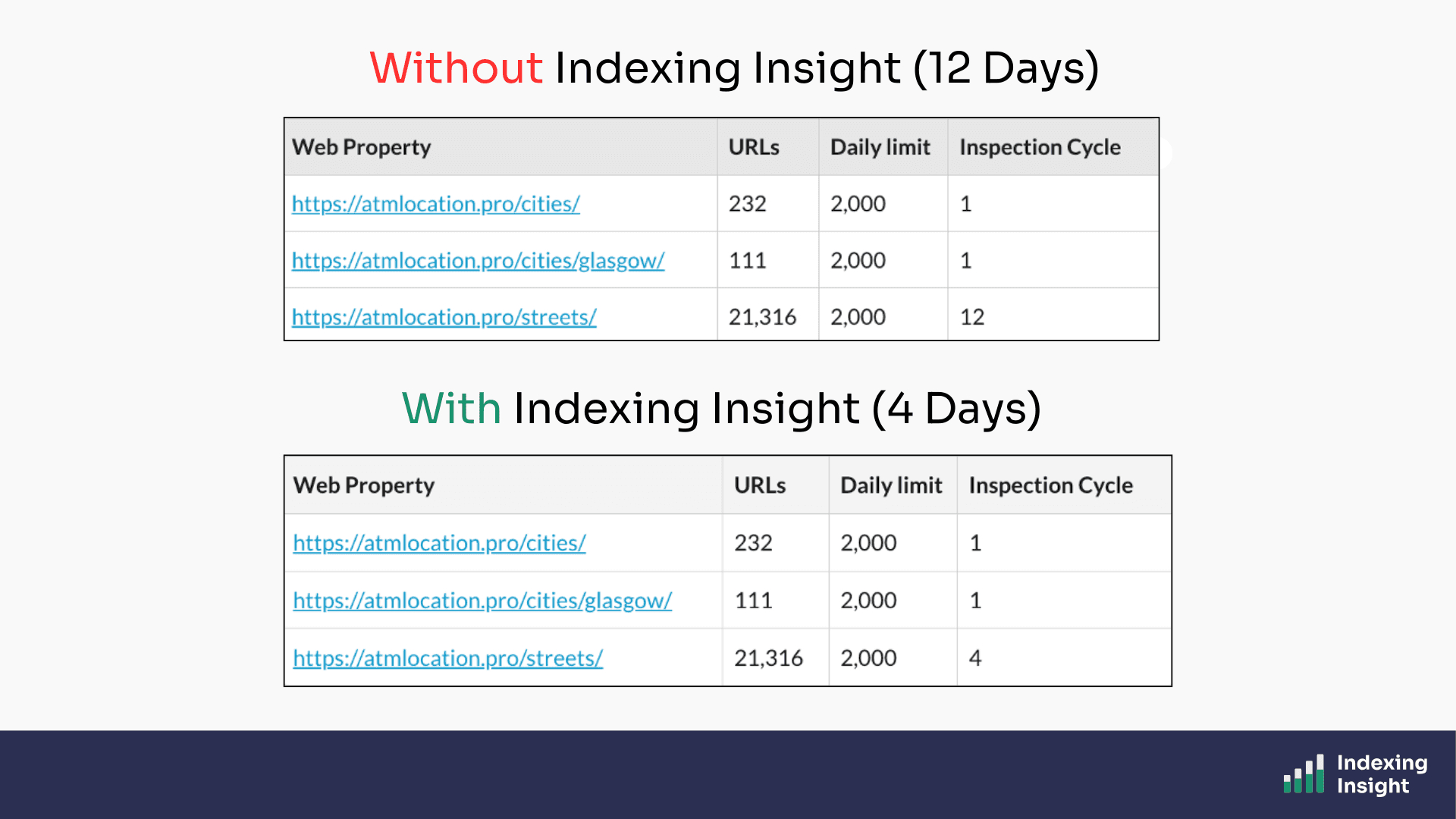
Each web property gets its own API quota, which means we can multiply the effective daily inspection rate across all your important page folders.
The result?
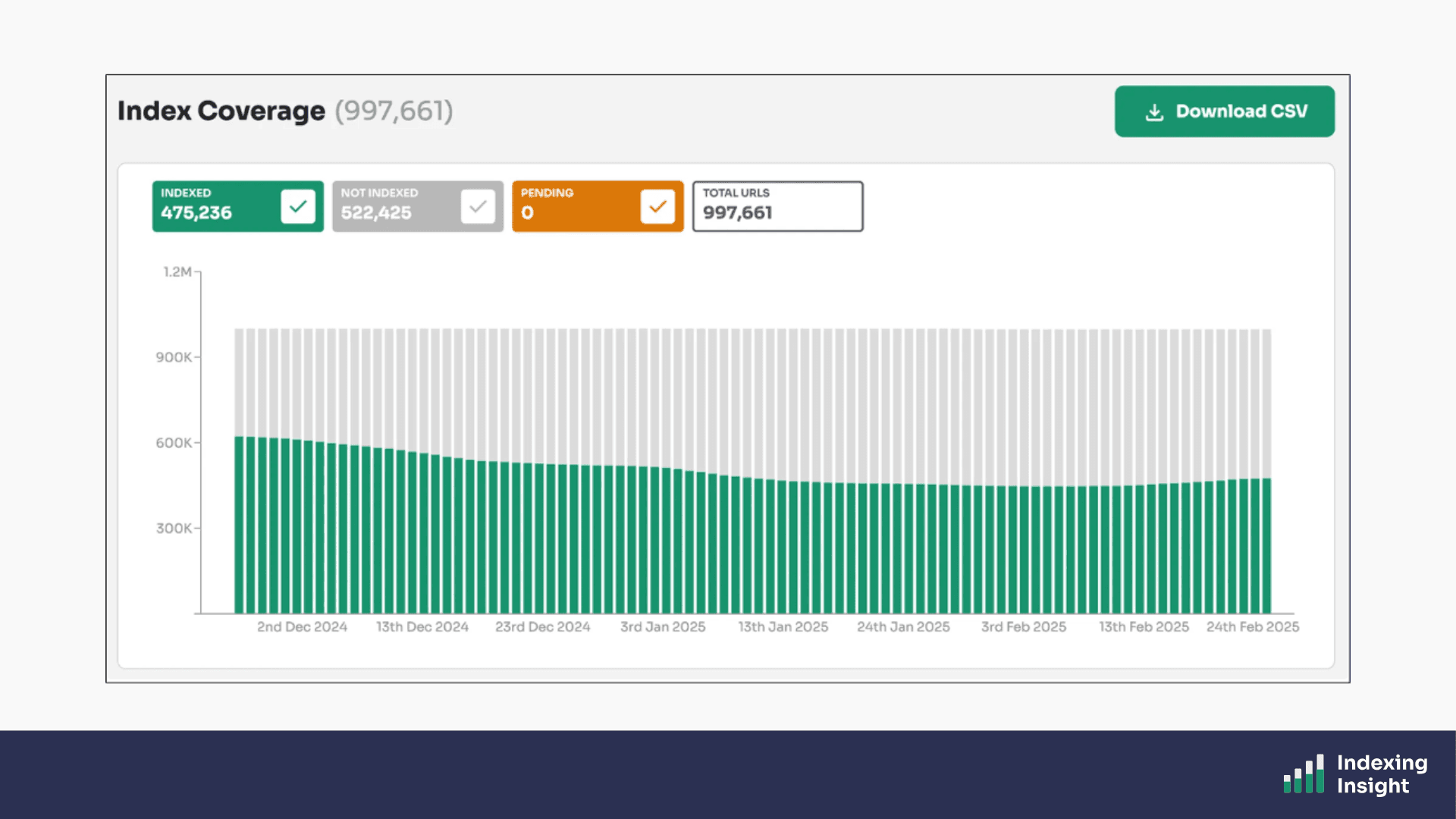
You can monitor up to 1 million pages at scale, all refreshing daily. No other tool on the market handles this the way we do.
Plans: Available on all plans.
Indexing Insight uses URL prefix web properties for each key folder.
The problem is that adding web properties manually to Google Search Console is slow and painful at scale.
Indexing Insight automates this.
We’ve built a web property feature that allows you to manually add URL-prefix properties at scale. You just need to decide which web properties you need to add.
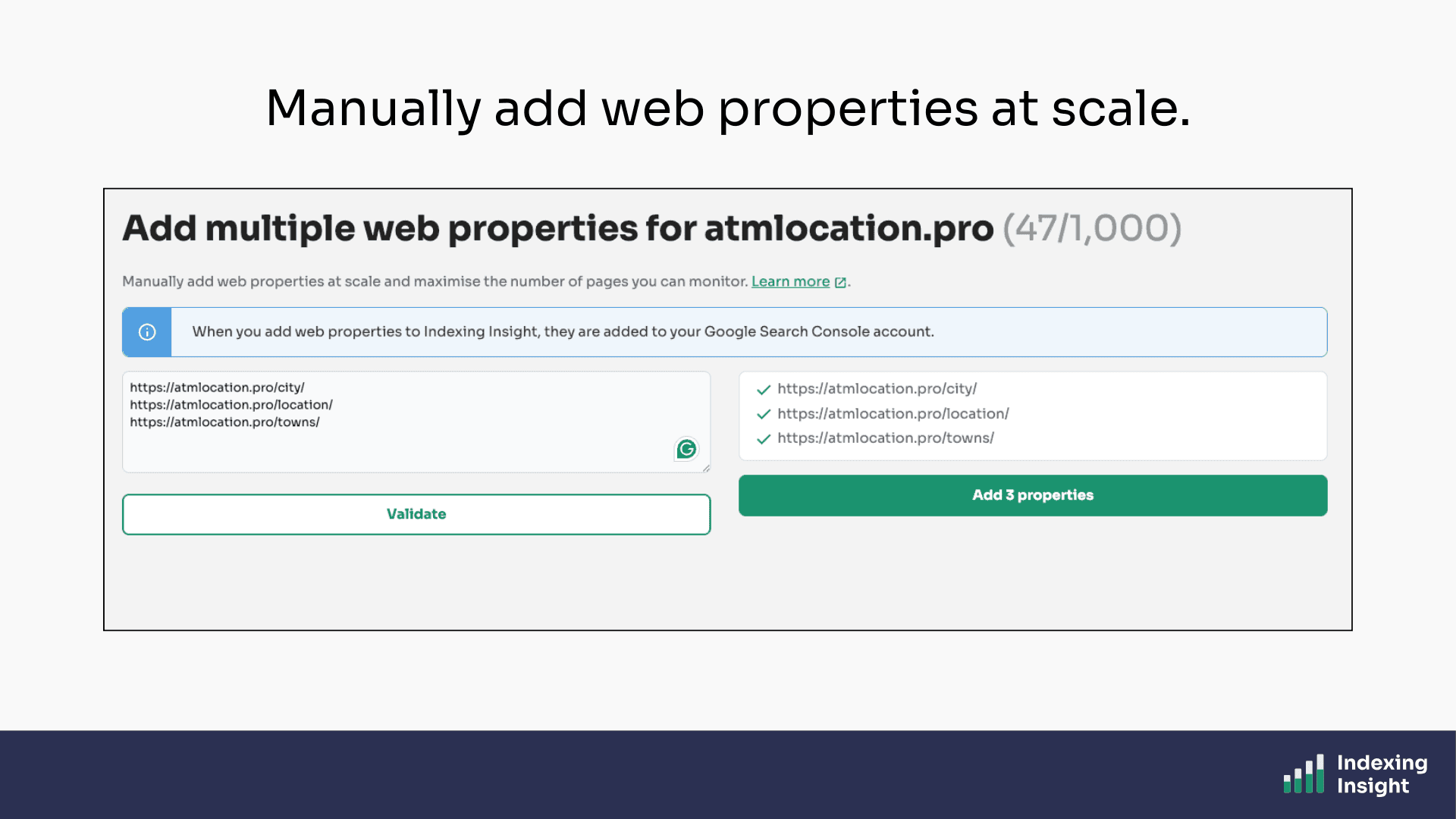
Then once you’ve added the web properties our scheduler does the rest.
Indexing Insight uses the GSC API to add web properties at scale into your Google Search Console account. It even handles mapping the new web properties to the list of downloaded page URLs and scheduling them to be inspected.
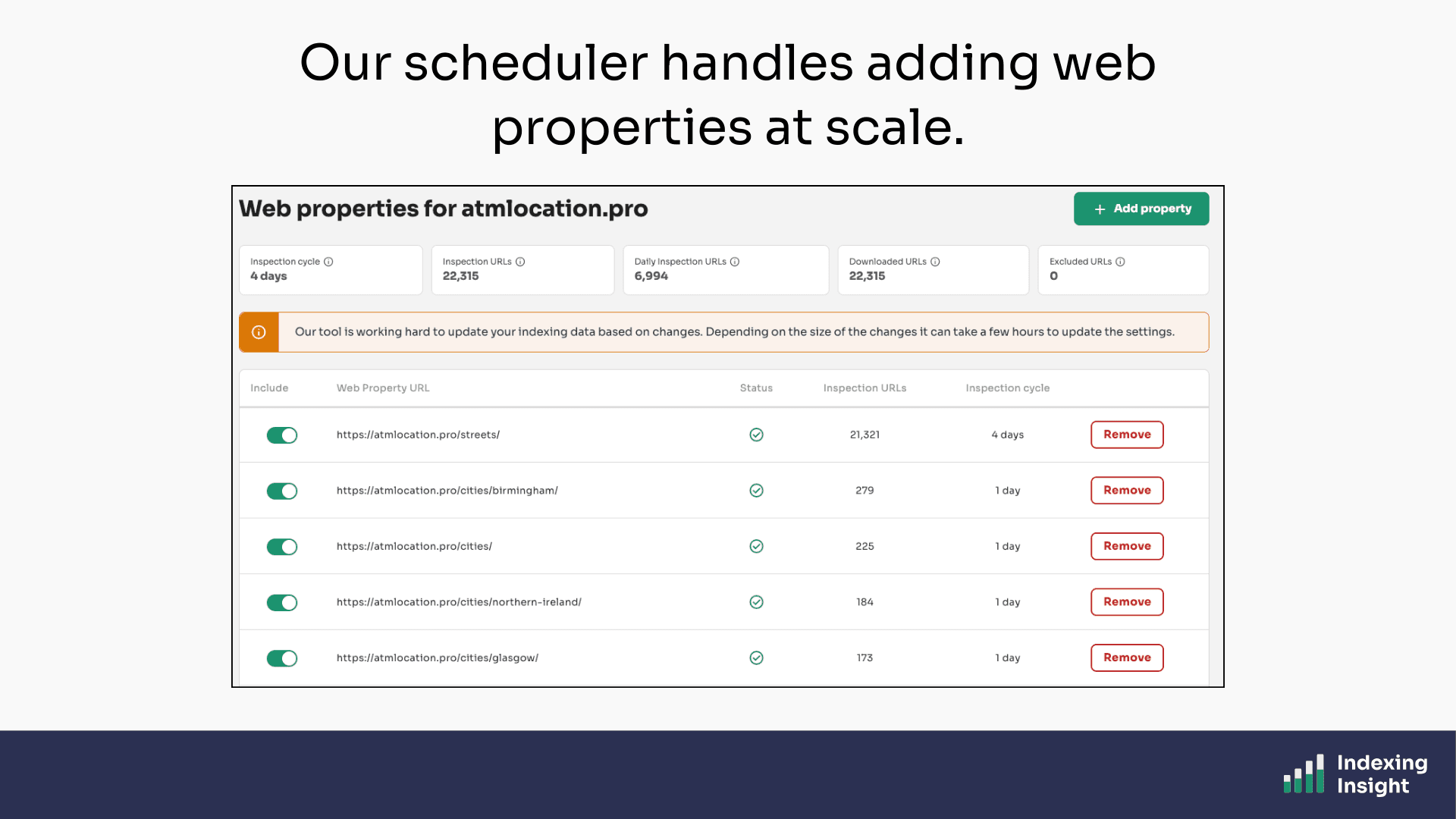
No more logging in Google Search Console to set up properties one by one.
Plans: Available on all plans.
Suggested Web Properties feature takes adding web properties a step further.
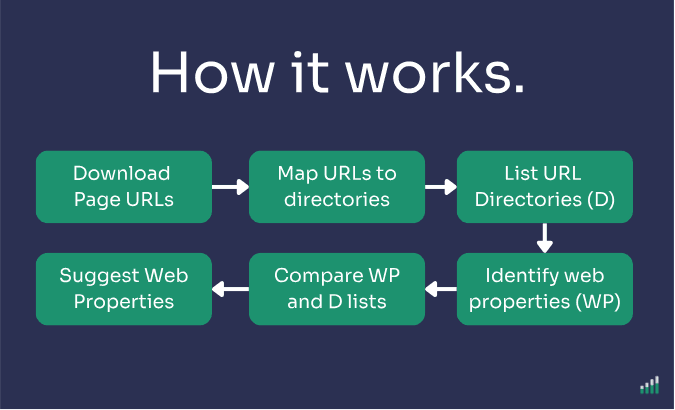
When we download your page URLs, we automatically analyse the downloaded page URL structure, and compare it against the web properties already set up in your Google Search Console account.
We then surface the missing ones, sorted by the largest number of page URLs, so you know exactly which folders to prioritise.
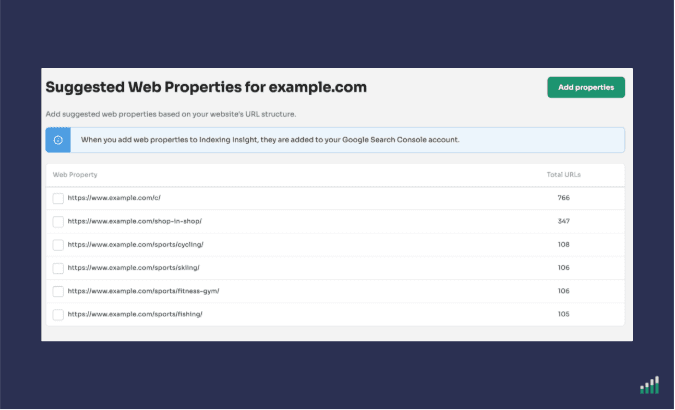
This feature is particularly useful when you're setting up monitoring for a large website for the first time.
Instead of figuring out which web properties to add manually, Indexing Insight does it for you in seconds.
Plans: Available on all plans.
Indexing Insight is designed to maximise the Google Search Console API limits.
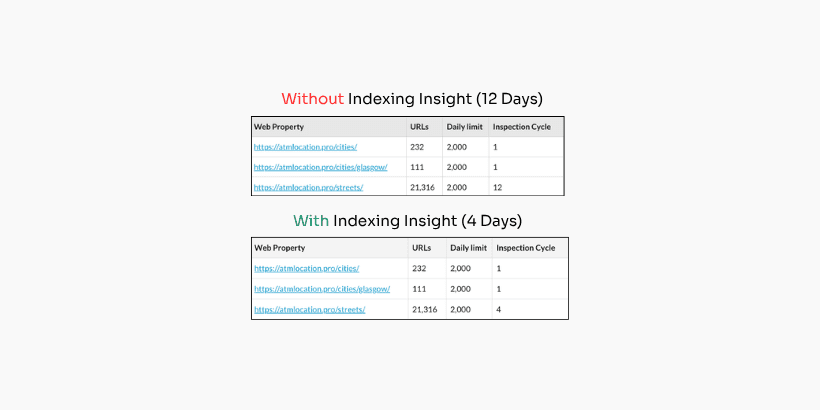
Our tool is built to get indexing data 2–3x faster on a daily basis than any other tool on the market.
We do this using 2 methods:
By using multiple web properties across your site's folder structure, we stack the available API limits and inspect far more pages per day than would otherwise be possible.
But it doesn’t stop there.
Even if competitors were able to add web properties at scale,we’d still be faster.
That’s because Indexing Insight doesn’t just use multiple web properties, it maximises the API limits of each property. So you get your data 3x faster on a daily basis than any other tool provider.
How can you tell?
Easy. Indexing Insight is designed to be transparent and tell you the maximum number of days it will take to monitor all your page URLs.
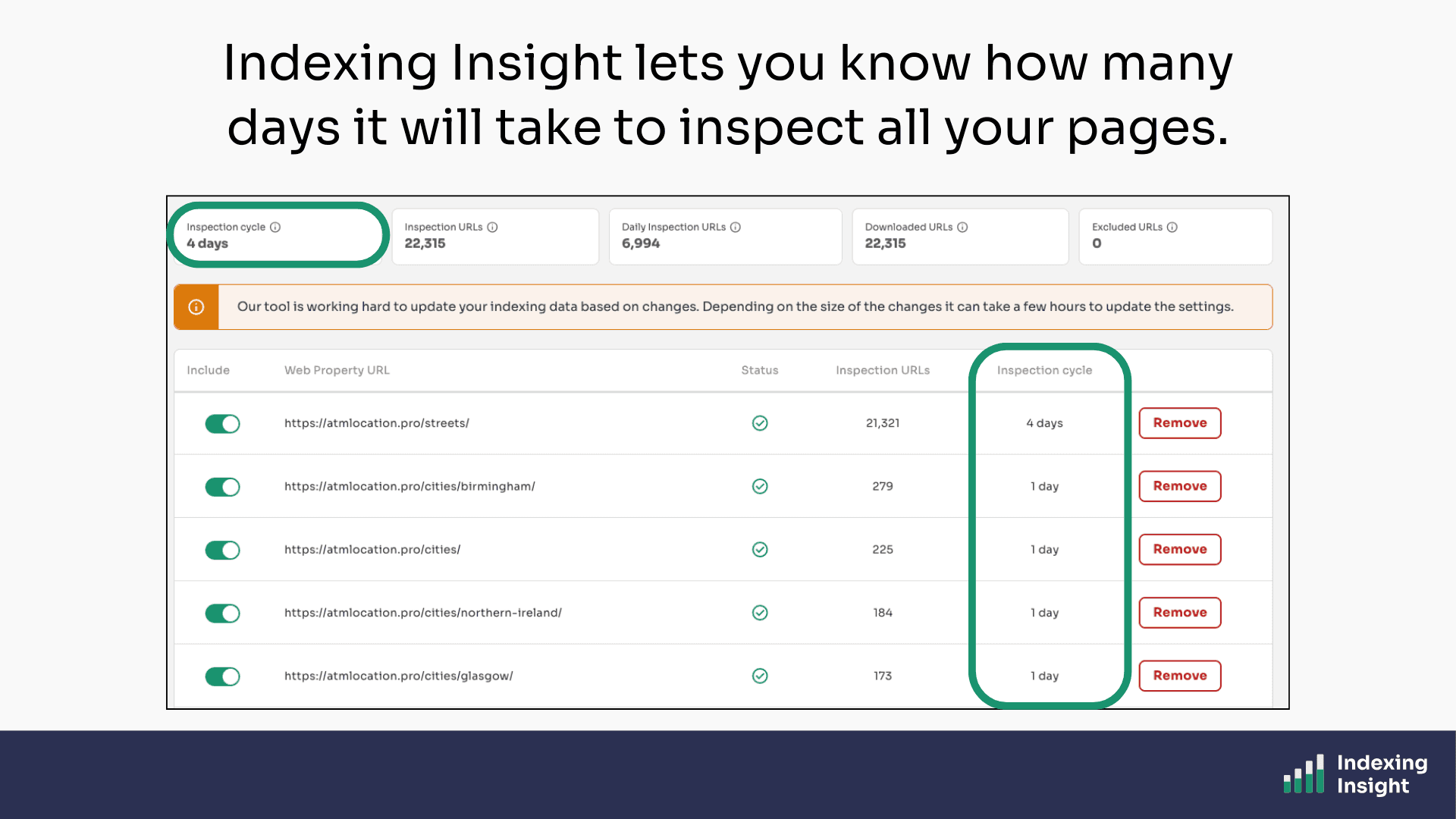
The best thing is that you can see how many days it takes per web property. You can get fresh indexing data for certain important website sections.
For large-scale websites, this isn't a minor improvement.
It's the difference between having fresh daily indexing data and waiting weeks to get a complete picture.
Plans: Available on all plans.
Indexing Insight doesn’t just monitor indexing data, it sends daily email alerts for each website.
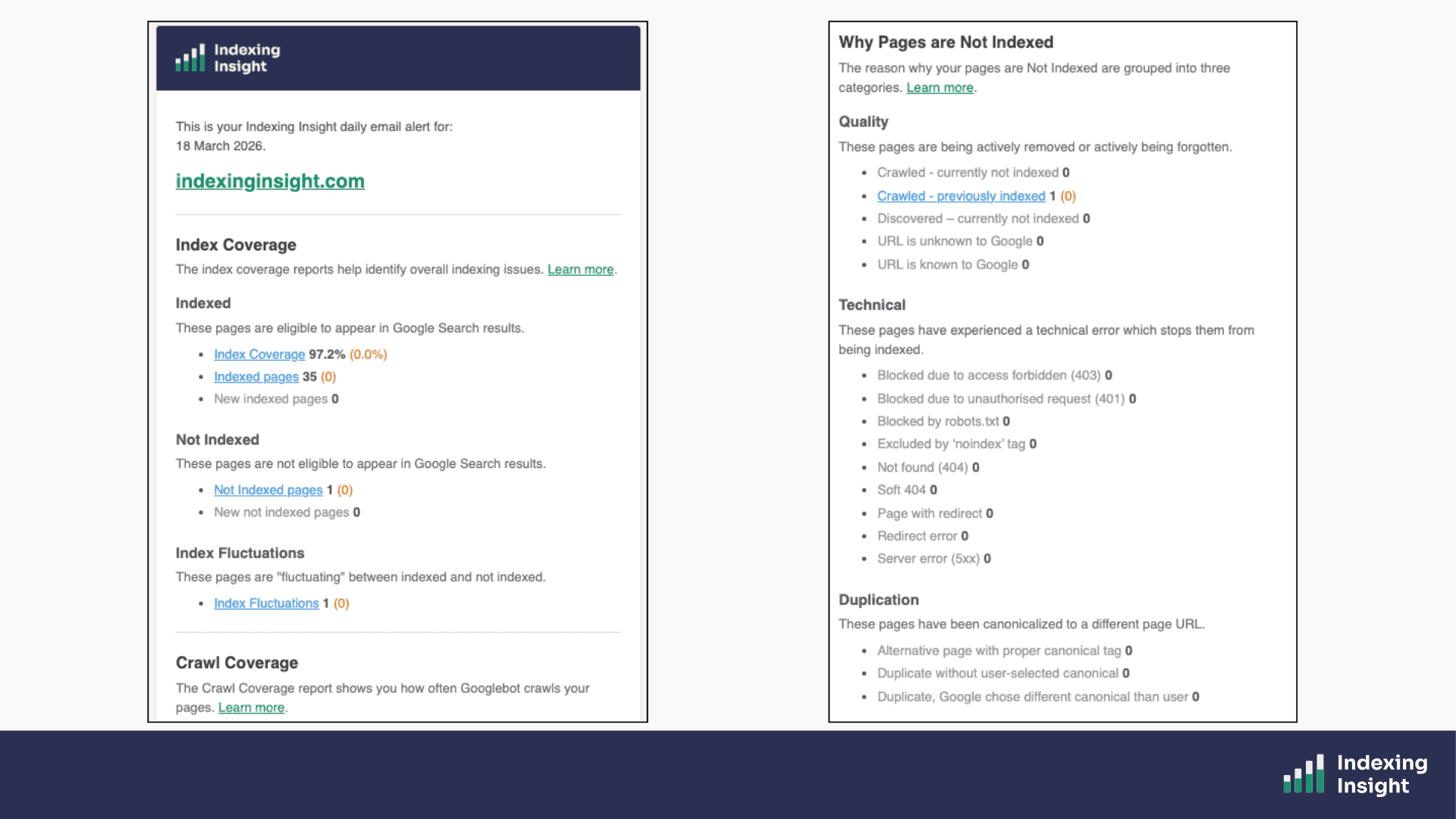
From day 1, we wanted to make sure that our tool was a Google index monitoring alert system. So, we built a daily email alert feature to help SEO teams keep up to date with Google indexing data in their inbox.
A proactive email alert system that helps identify critical indexing issues at scale.
Plans: Available on all plans.
Indexing Insight monitors your XML sitemaps on a daily basis.
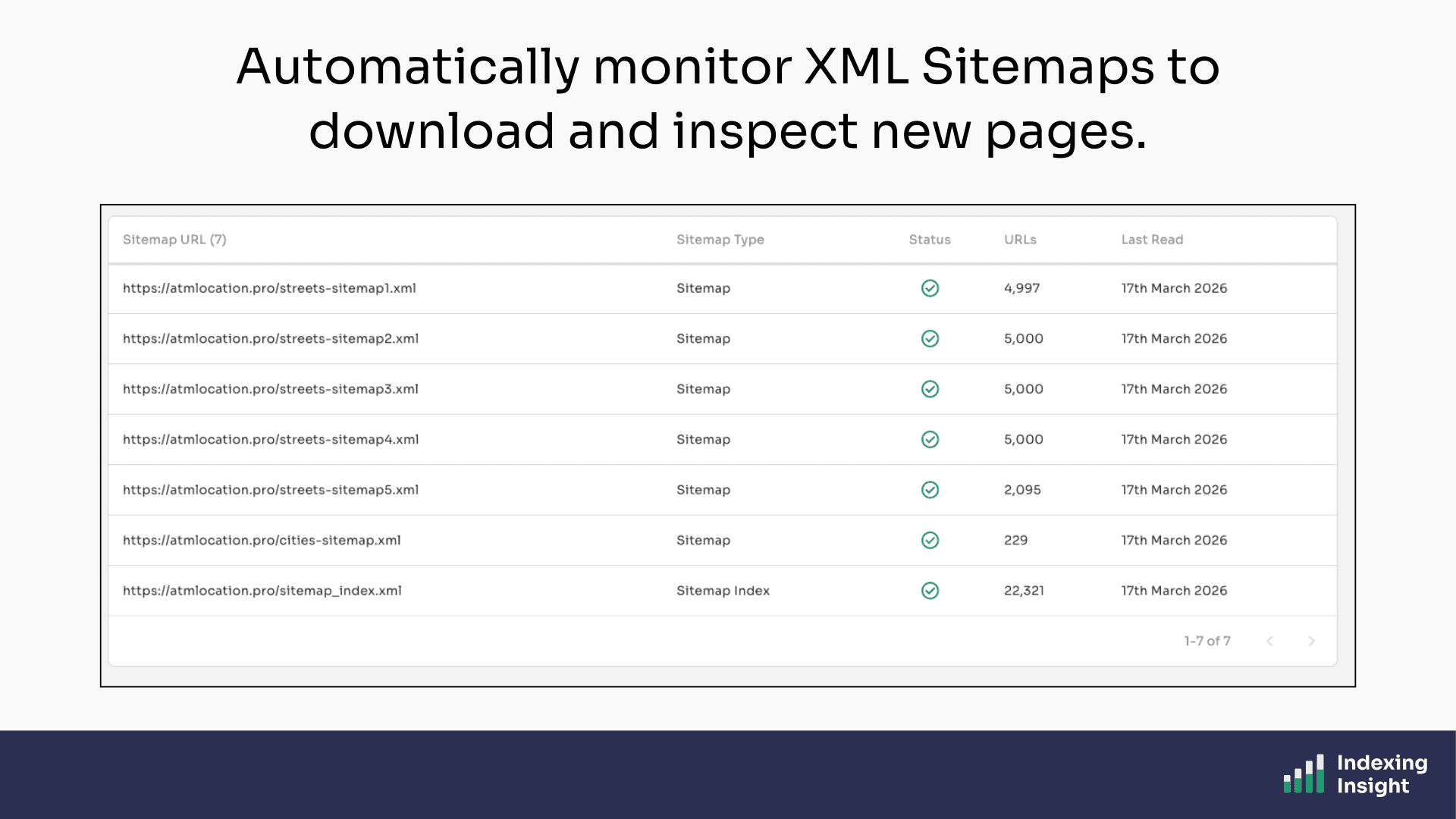
By using sitemaps as the input, we ensure that every page being monitored is a page you actually care about. Once your sitemaps are connected, our tool checks them automatically every day for changes.
New pages added to your sitemap are detected and queued for inspection. Removed pages are flagged. Everything stays in sync, without you having to do a thing.
Plans: Available on all plans.
Google Search Console caps you at 1,000 sample URLs in any report. You can't filter beyond a handful of options, and sorting is basic.
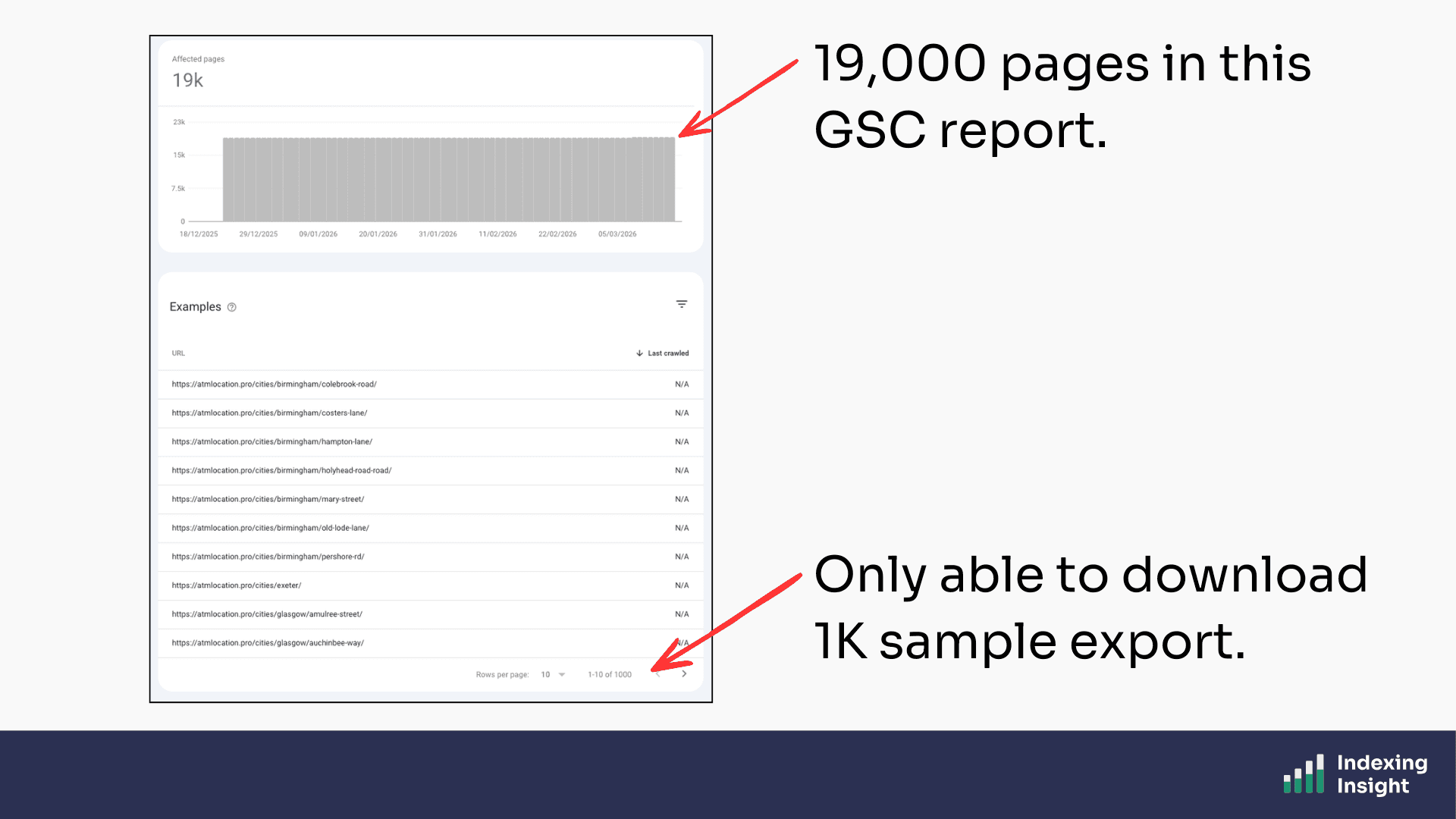
Indexing Insight removes these limitations entirely.
Every page URL we monitor is available to view, filter, and sort in the tool. You can filter by index coverage state, segment by folder, sort by days since last crawl, and download everything.
No row limits, no caps.
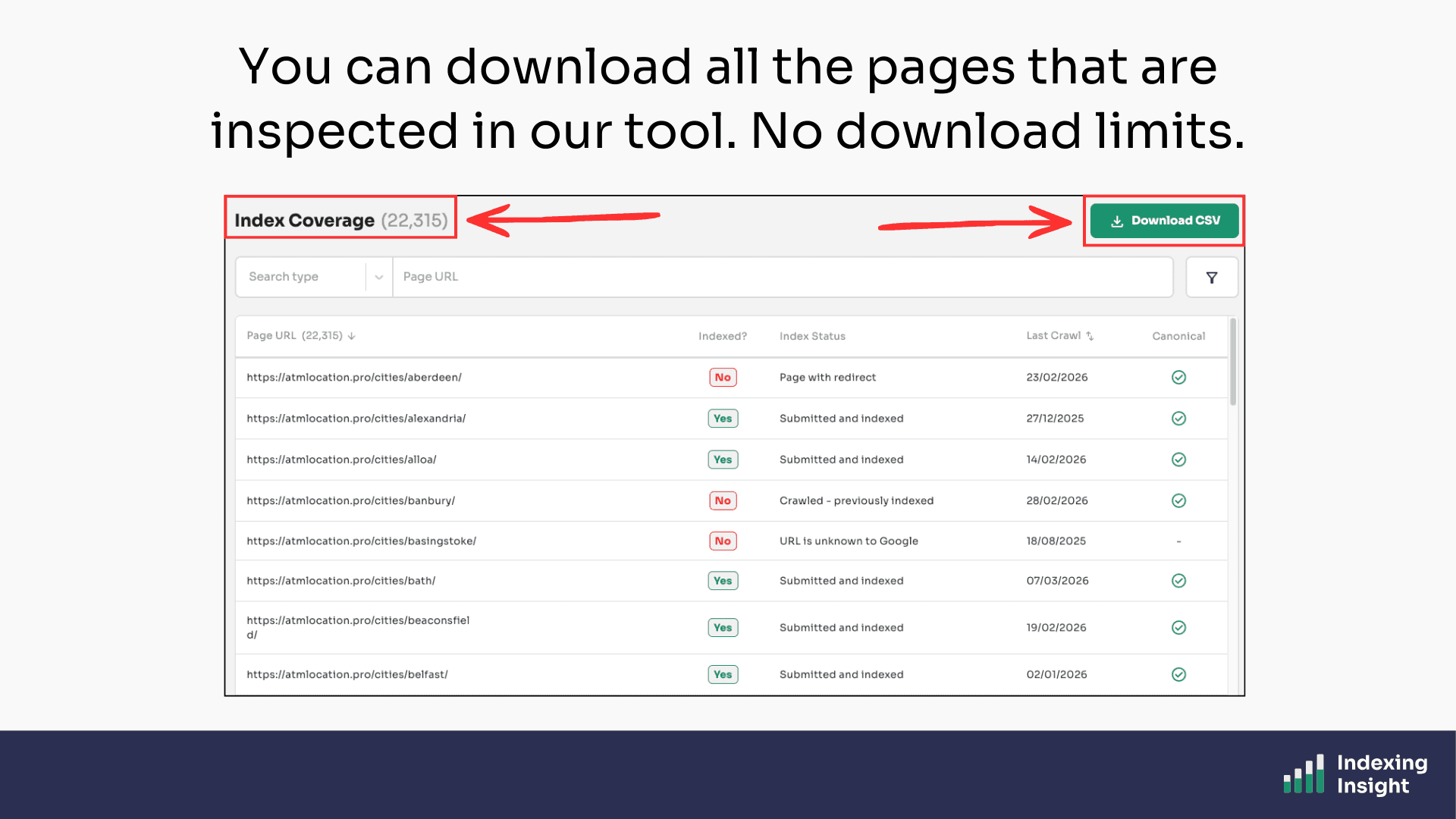
This matters when you're trying to identify patterns across tens of thousands of pages. Google Search Console gives you a sample. Indexing Insight gives you the full picture.
Plans: Available on all plans.
In Google Search Console you can only segment by XML sitemap.
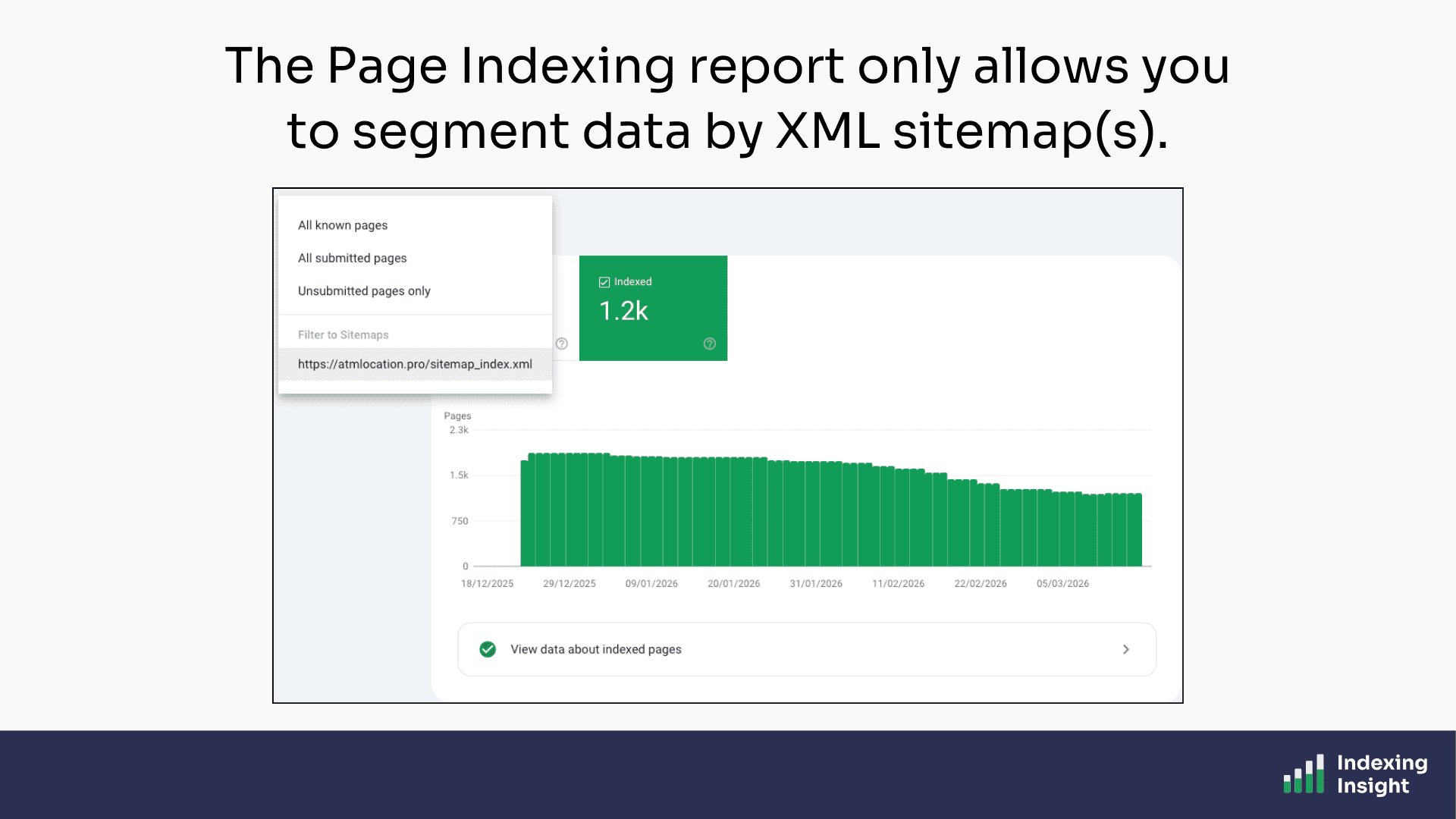
A single top-level view of your indexing data isn't enough. You need to understand what's happening at the section level by category, by product line, by language, by content type.
Indexing Insight automatically segments your data based on URL structure…
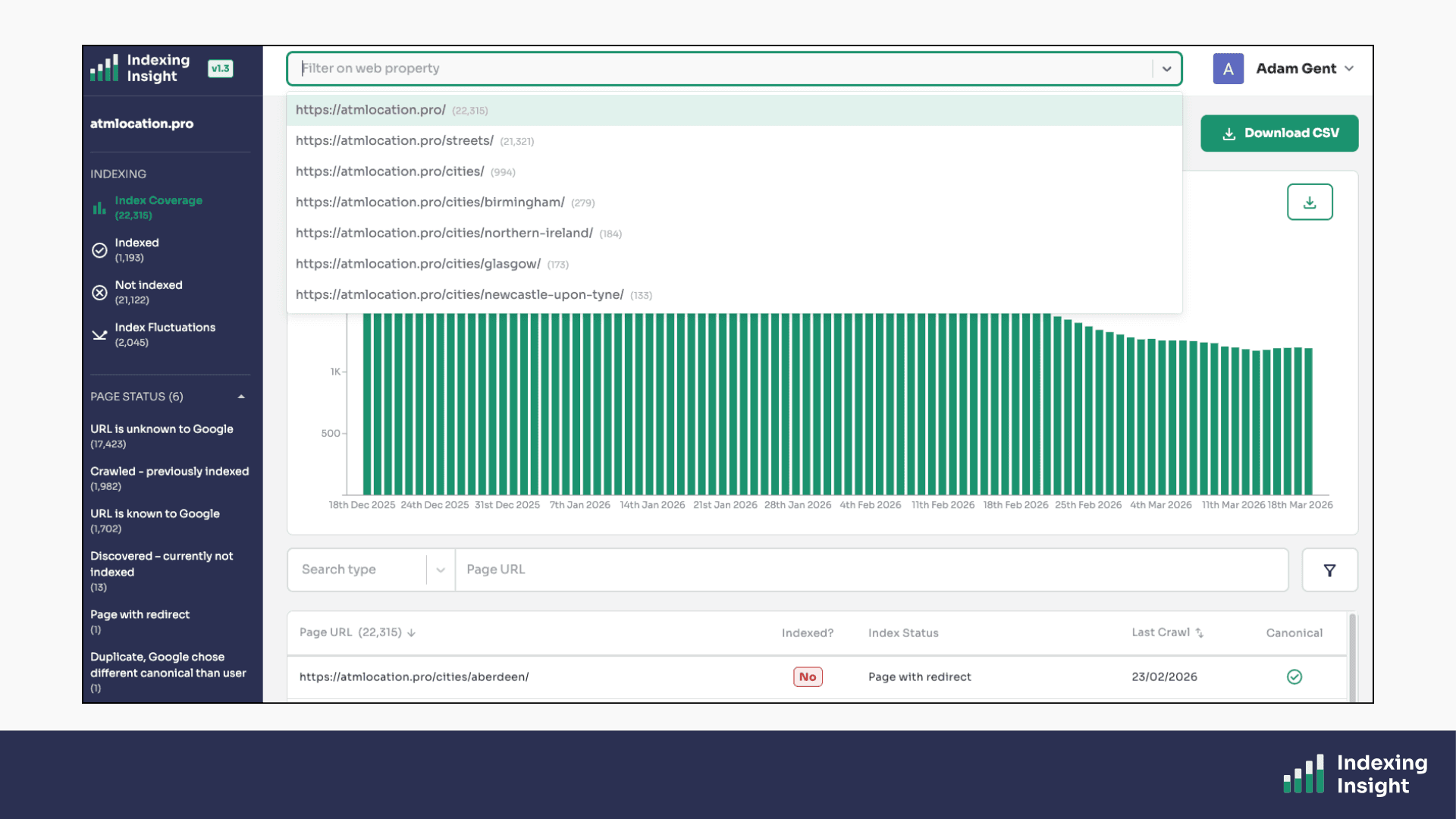
…you can filter ALL reports by any directory segment on your site.
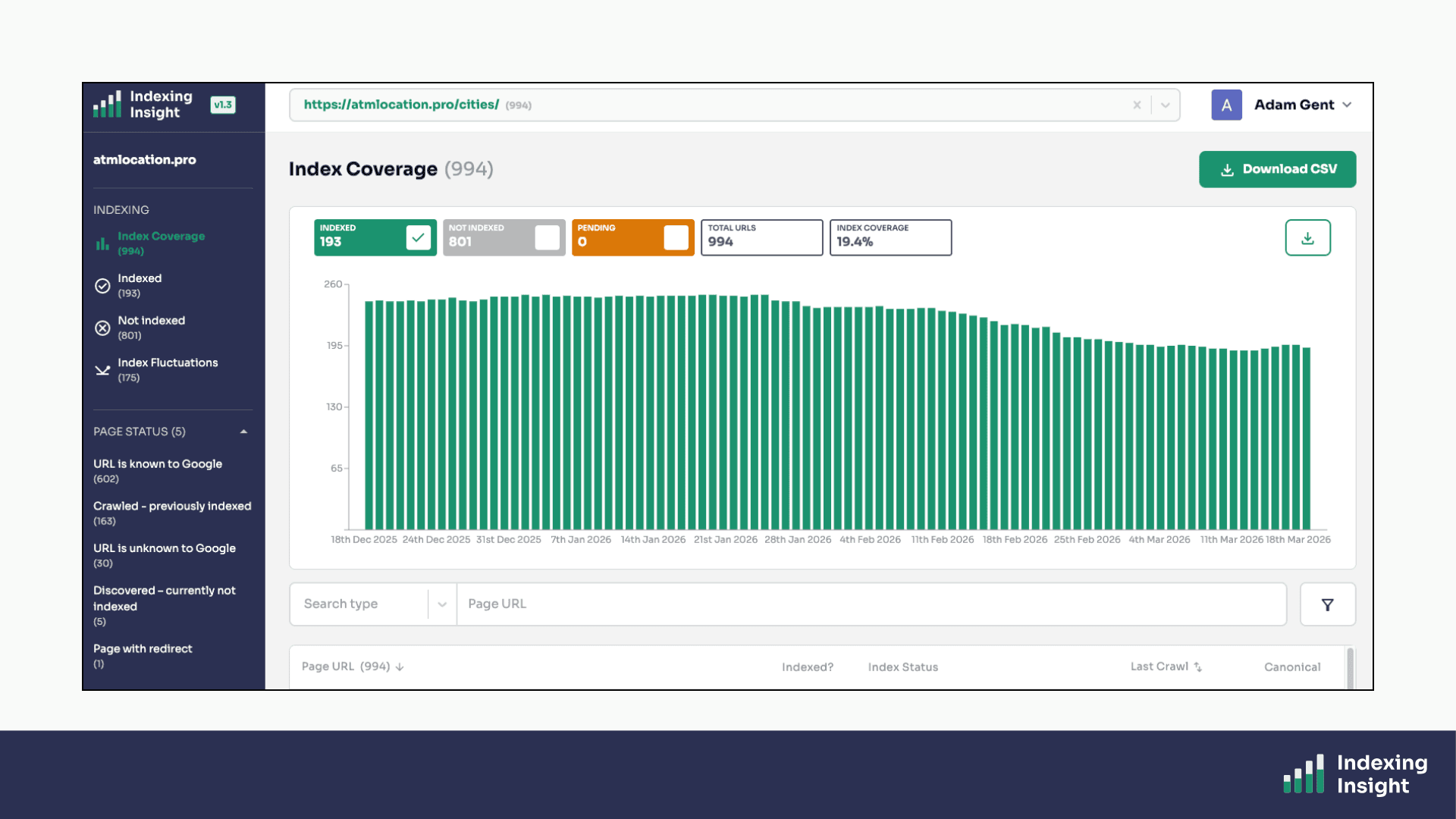
This means you can answer questions like:
Those questions are impossible to answer in Google Search Console. In Indexing Insight, they take seconds.
Plans: Available on Automate, Scale and Company plans.
Indexing Insight can be used as a reporting tool usingindex coverage rate.
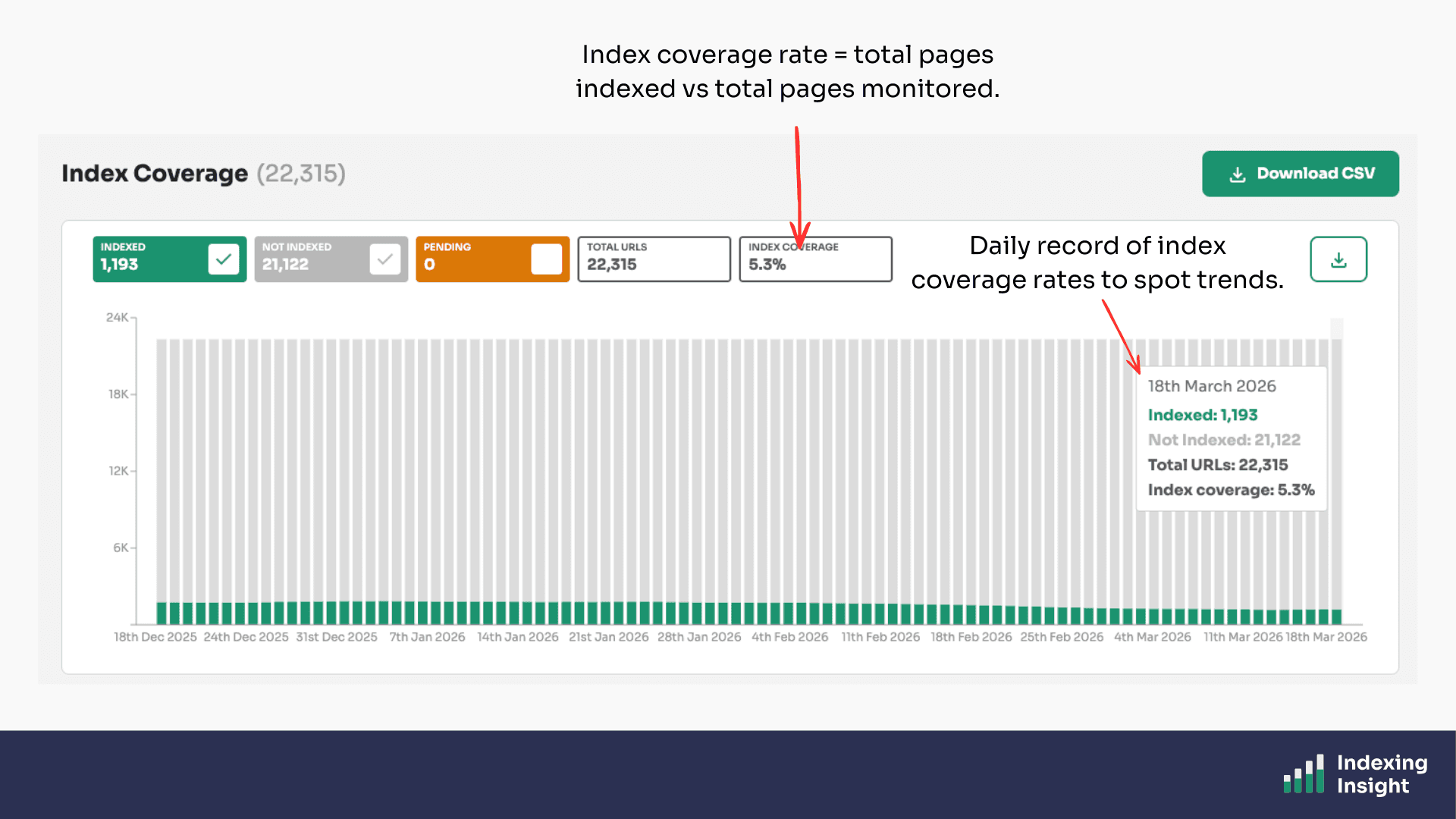
The metric is simple.
The index coverage rate is a metric that tells you what percentage of your submitted pages are actually indexed by Google.
It's a simple but powerful number.
If you have 100,000 pages in your sitemaps and 60,000 are indexed, your index coverage rate is 60%.
Indexing Insight calculates this metric for your overall website and for each individual segment, giving you a clear view of how well Google is indexing your most important content.
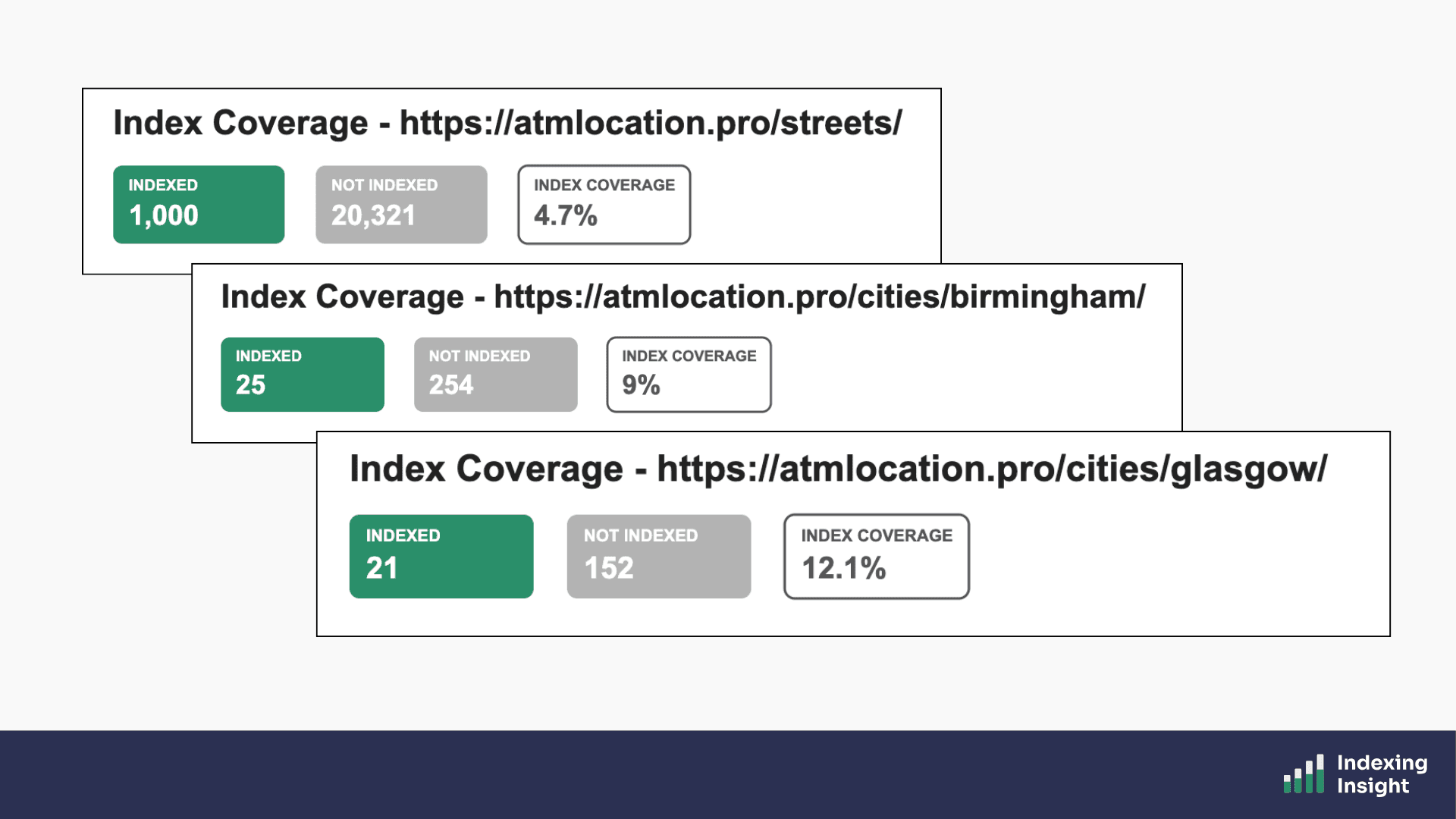
You can track how this rate changes over time, especially after Google core updates, to understand whether your indexing health is improving or deteriorating.
Plans: Available to all plans.
Just like the Page Indexing report, Indexing Insight provides individual reports to tell you why important pages are not indexed.
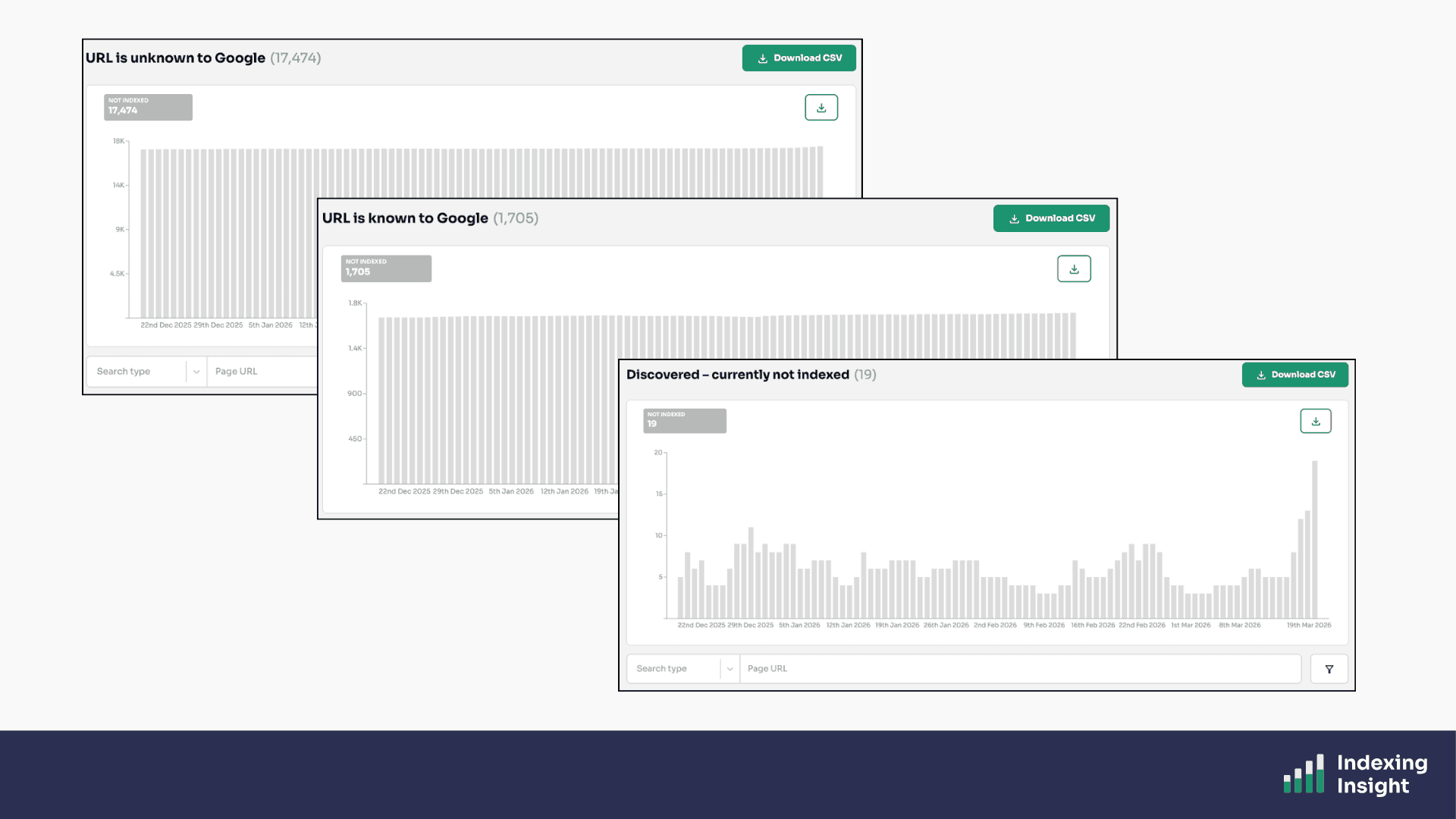
Indexing Insight gives you the same breakdown but with key differences:
These reports are powered by the URL Inspection API, and track the Not Indexed statuses of pages on a daily basis.
But we go even further.
Rather than just copy Google’s index reports ('Crawled - Currently Not Indexed', 'Discovered - Currently Not Indexed', etc.) we have created our own unique reports.
Our research has uncovered that these index coverage states aren’t always clear.
So, we created our own index coverage states and reports to help our customers identify exactly why important pages are not being indexed.
For example, based on research we have created the ‘crawled - previously indexed’ report. Which highlights all the indexed pages which have been actively removed by Google.
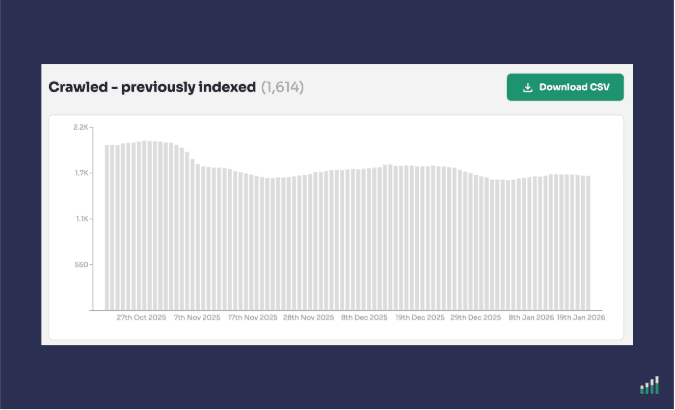
You can see the full list of actively removed pages, filter it, and download it without any row limits.
Plans: Available on Automate, Scale and Company plans.
Every time you publish a new piece of content, you want to know:has Google indexed it?
Yeah, use too.
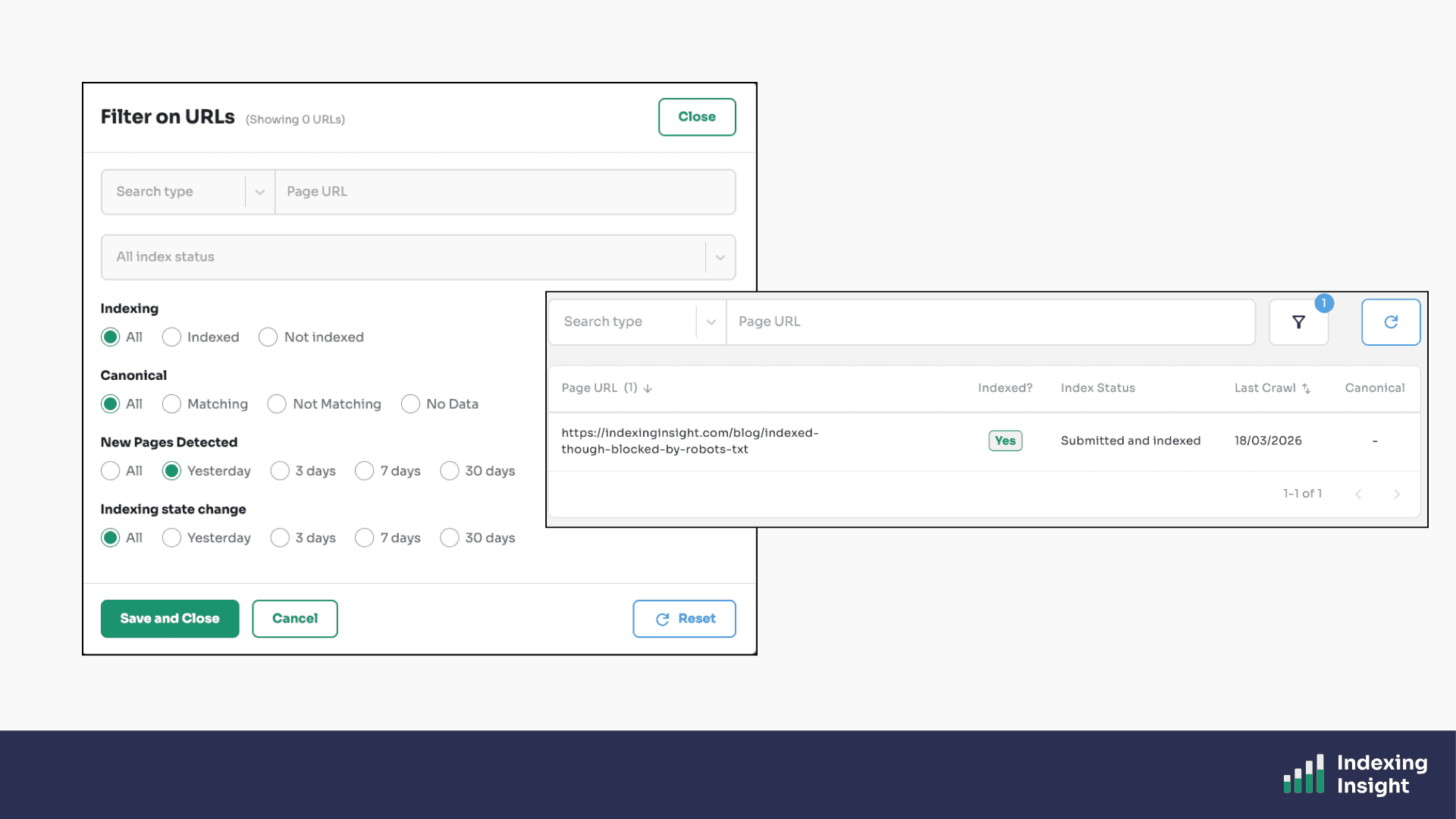
That’s why at Indexing Insight we built a New Pages Detected feature that automatically monitors your XML sitemaps for newly published URLs.
When we detect a new page, we prioritise it for inspection and record the indexing data as soon as it's available.
We also timestamp exactly when the new page was detected.
This means you can filter your reports to see only newly published pages and immediately understand whether Google is picking them up.
But that’s not all.
We also include tell you in our daily email alert the total number of New Pages that have been indexed.
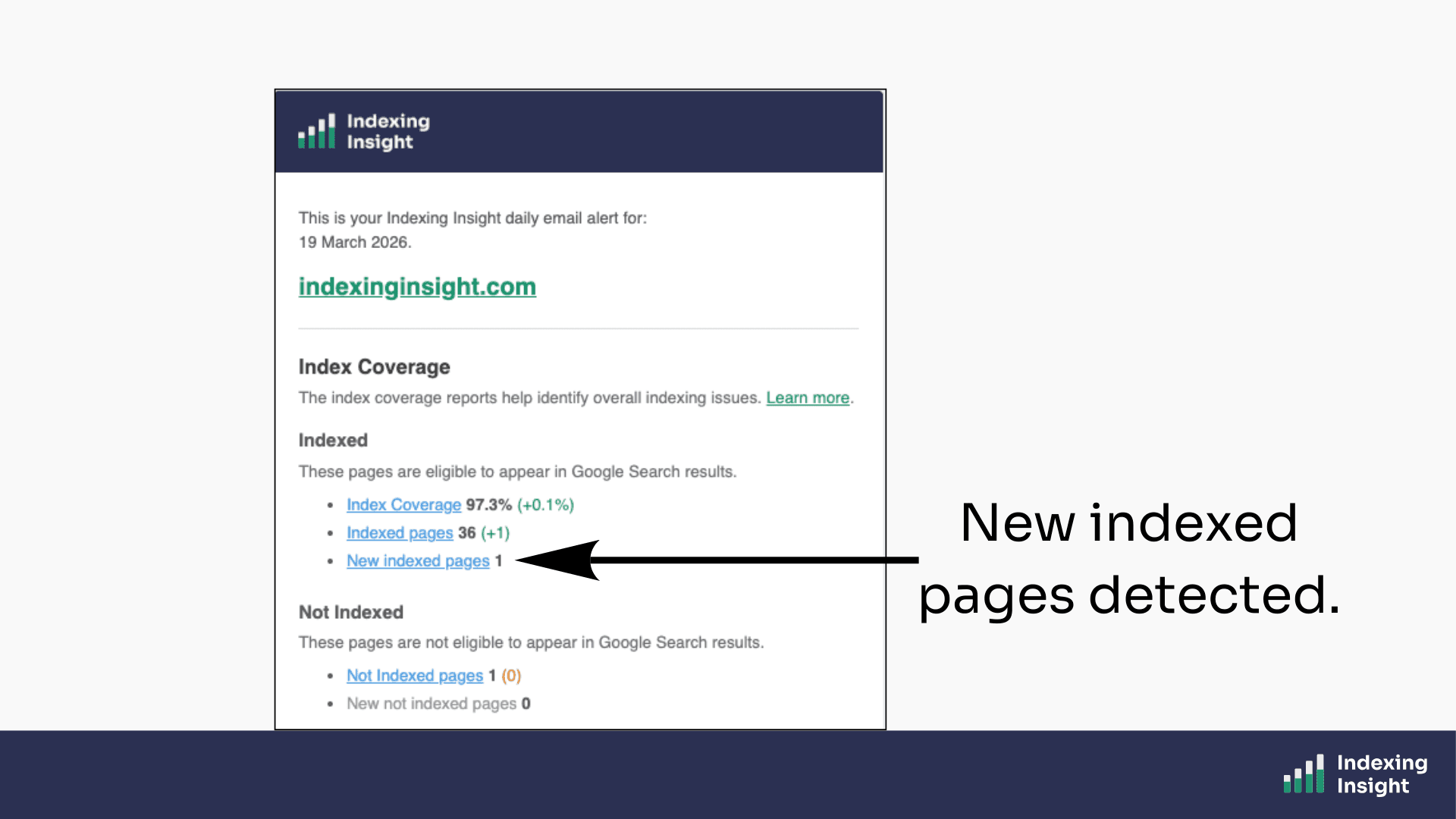
Which means if a batch of new pages aren't being indexed, you'll be alerted as part of the automatic monitoring process.
Plans: Available on all plans.
Index coverage states are not static.
A page that is 'Submitted and Indexed' today can become 'Crawled - Currently Not Indexed' tomorrow. And then 'Discovered - Currently Not Indexed' a month later. And then 'URL is Unknown to Google' six months after that.
Google Search Console doesn't track any of this.
If you check the URL Inspection tool, you only ever see the current state. The history is invisible.
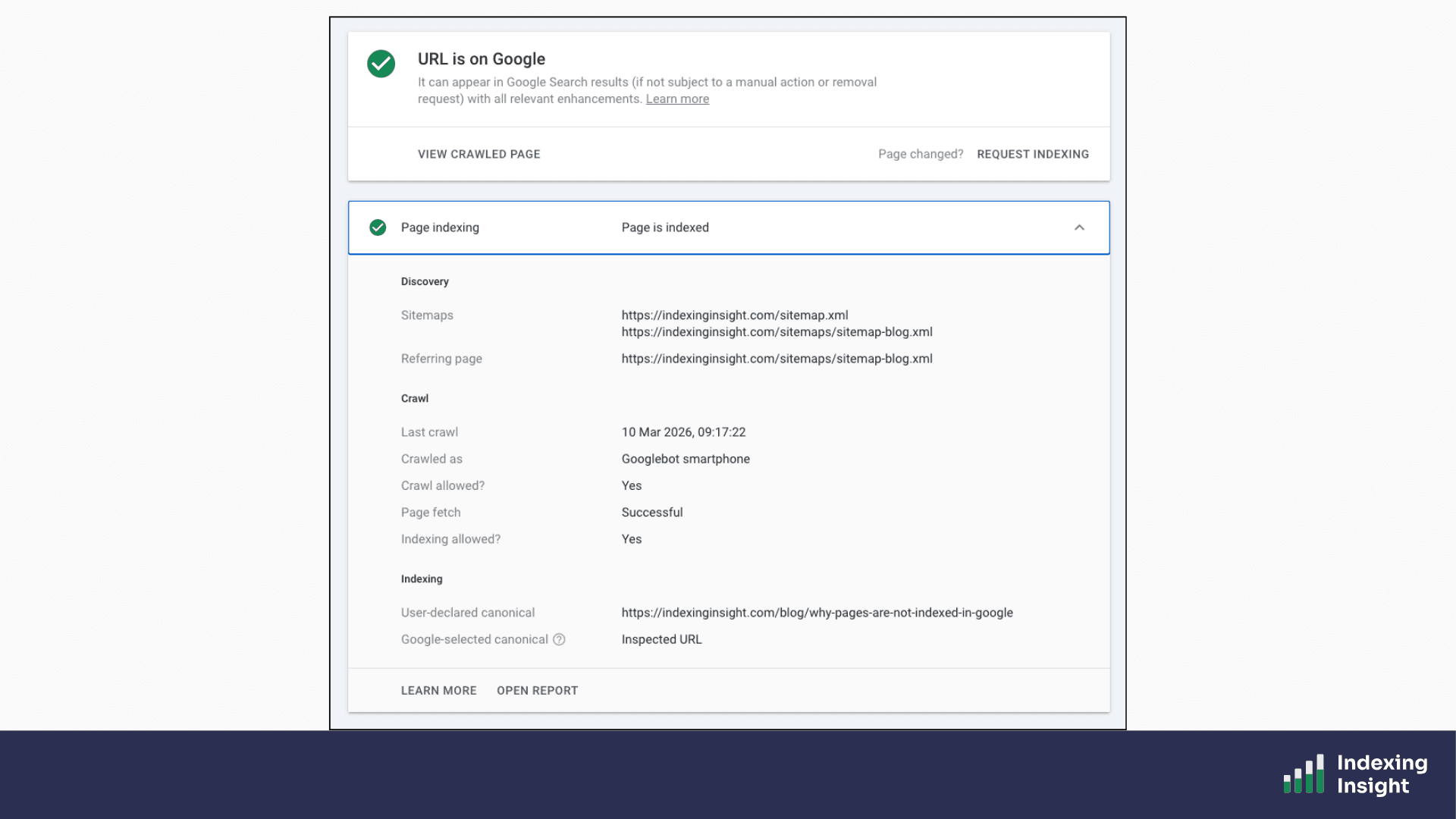
Indexing Insight records every time a page's index coverage state changes.
You can see exactly when the state changed, what it changed from, and what it changed to. We even provide a direct link to the historic URL Inspection data in Google Search Console so you can verify the change yourself.
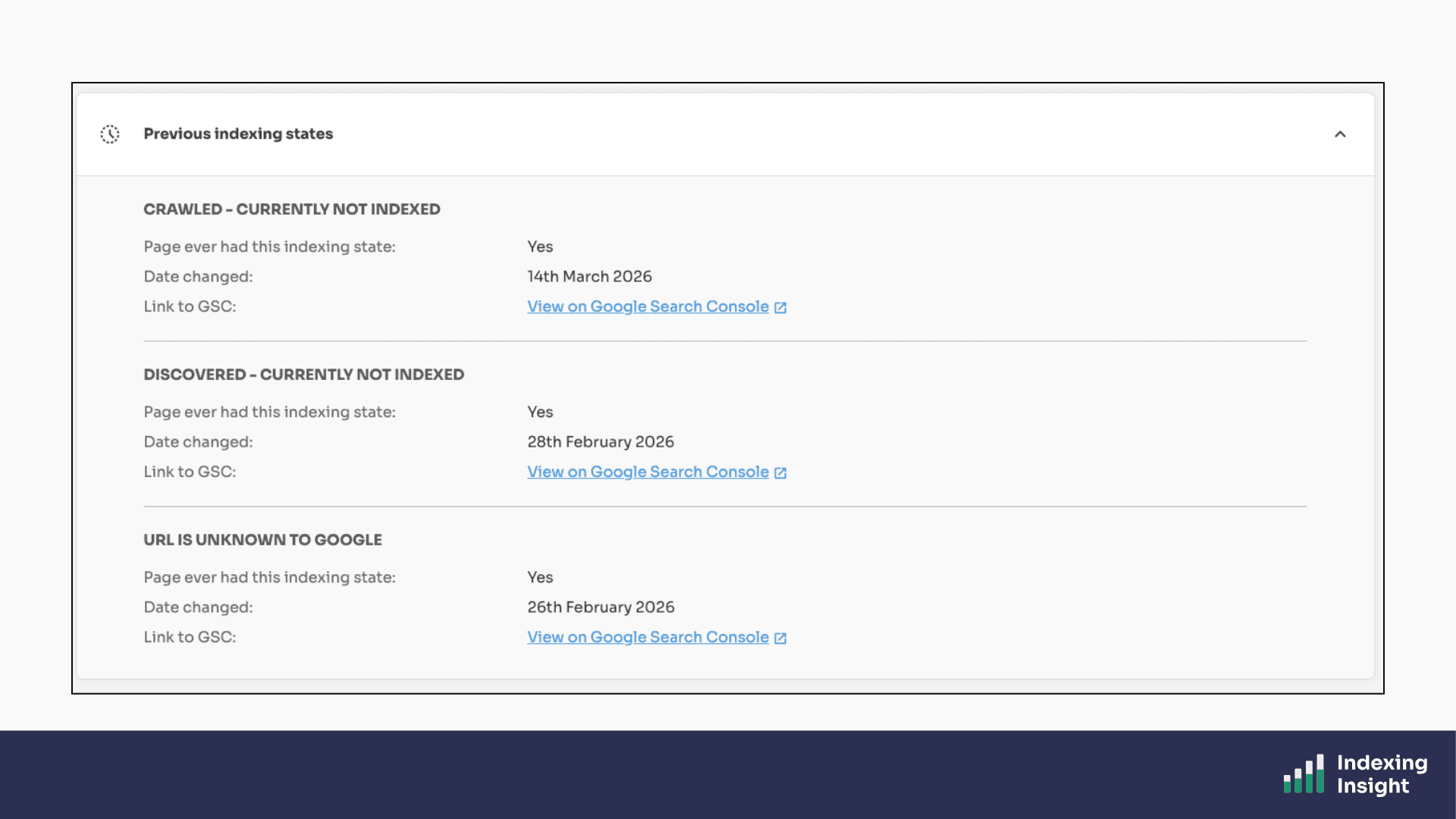
This is the only way to understand how Google's indexing system is treating your pages over time.
Plans: Available on all plans.
One of the most important, and least understood, indexing problems is active deindexing.
Google doesn't just fail to index pages.
It actively removes pages that were previously indexed from its search results. This happens constantly, and it accelerates significantly during and after Google core updates.
The 'Crawled - Previously Indexed' report in Indexing Insight tracks exactly this.
Whenever we detect a page moving from 'Submitted and Indexed' to 'Crawled - Currently Not Indexed', we flag it with our unique 'Crawled - Previously Indexed' status.
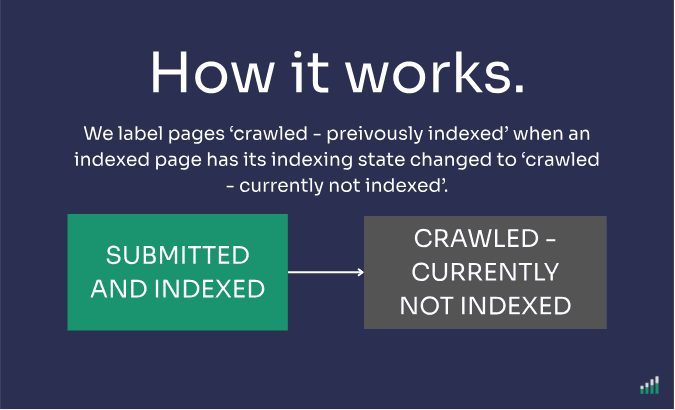
Google Search Console has no equivalent report.
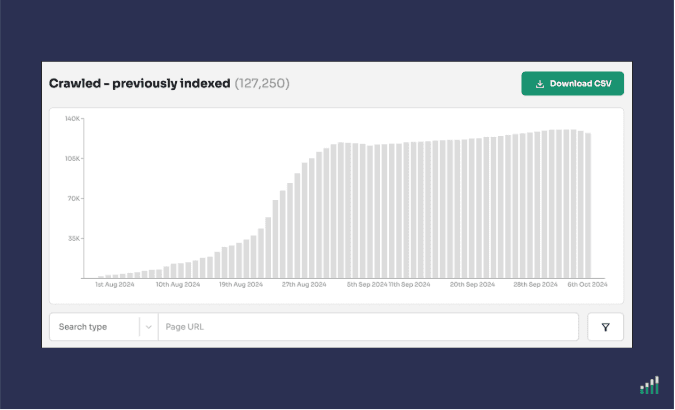
It lumps these pages in with pages that were never indexed in the first place, which makes it impossible to understand the true scale of the problem.
For one of our customers, over 130,000 pages had this status — representing 13% of their total monitored pages. None of that was visible in Google Search Console.
Plans: Available on Automate, Scale and Company plans.
Google doesn’t just actively deindex pages, it actively forgets them as well.
As we've written on our blog, Google can 'forget' pages that were previously crawled and indexed.
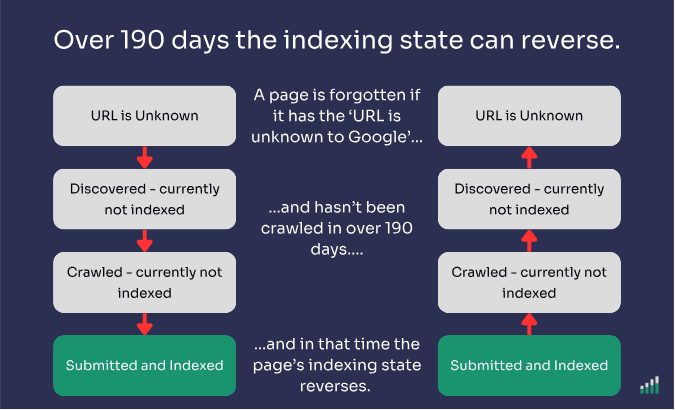
These pages end up with the 'URL is Unknown to Google' state, which Google's own documentation describes as pages Google has never seen before.
But that's not always true.
The 'URL is Known to Google' report in Indexing Insight identifies which of your not indexed pages have been previously crawled and indexed by Google, but have since been forgotten.
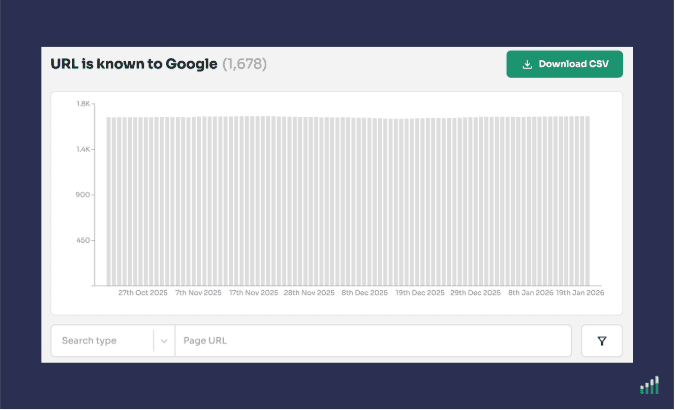
Google Search Console groups these forgotten pages under 'Discovered - Currently Not Indexed', hiding the true scale of the issue.
Indexing Insight surfaces them correctly.
Plans: Available on Automate, Scale and Company plans.
Indexing Insight's Crawl Coverage report gives you an alternative to log files.
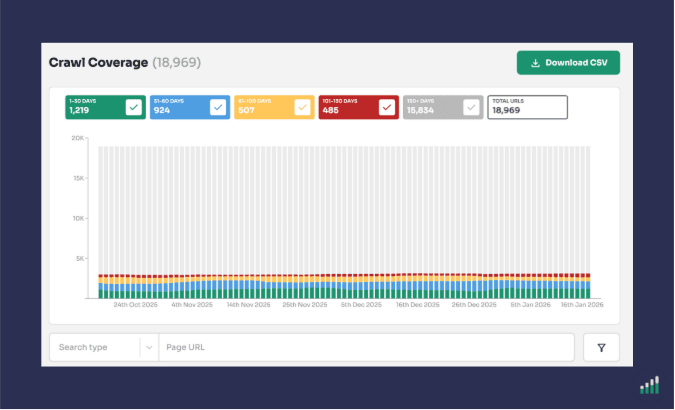
Using the Last Crawl Time data from the URL Inspection API, we calculate a 'Days Since Last Crawl' metric for every monitored page URL.
We then group pages into time buckets, crawled in the last 7 days, last 30 days, last 90 days, and so on, giving you a clear picture of Googlebot's crawl activity across your site.
You can use this report to monitor Googlebot activity on key pages, identify which pages are at risk of being deindexed based on their last crawl date, and understand which not indexed pages are being frequently recrawled by Google.
No log files required.
Plans: Available on Scale and Company plans.
Indexing Insight captures both indexing state data and crawl data (Last Crawl Time) for every monitored URL.
This means you can combine both data points in a single view.
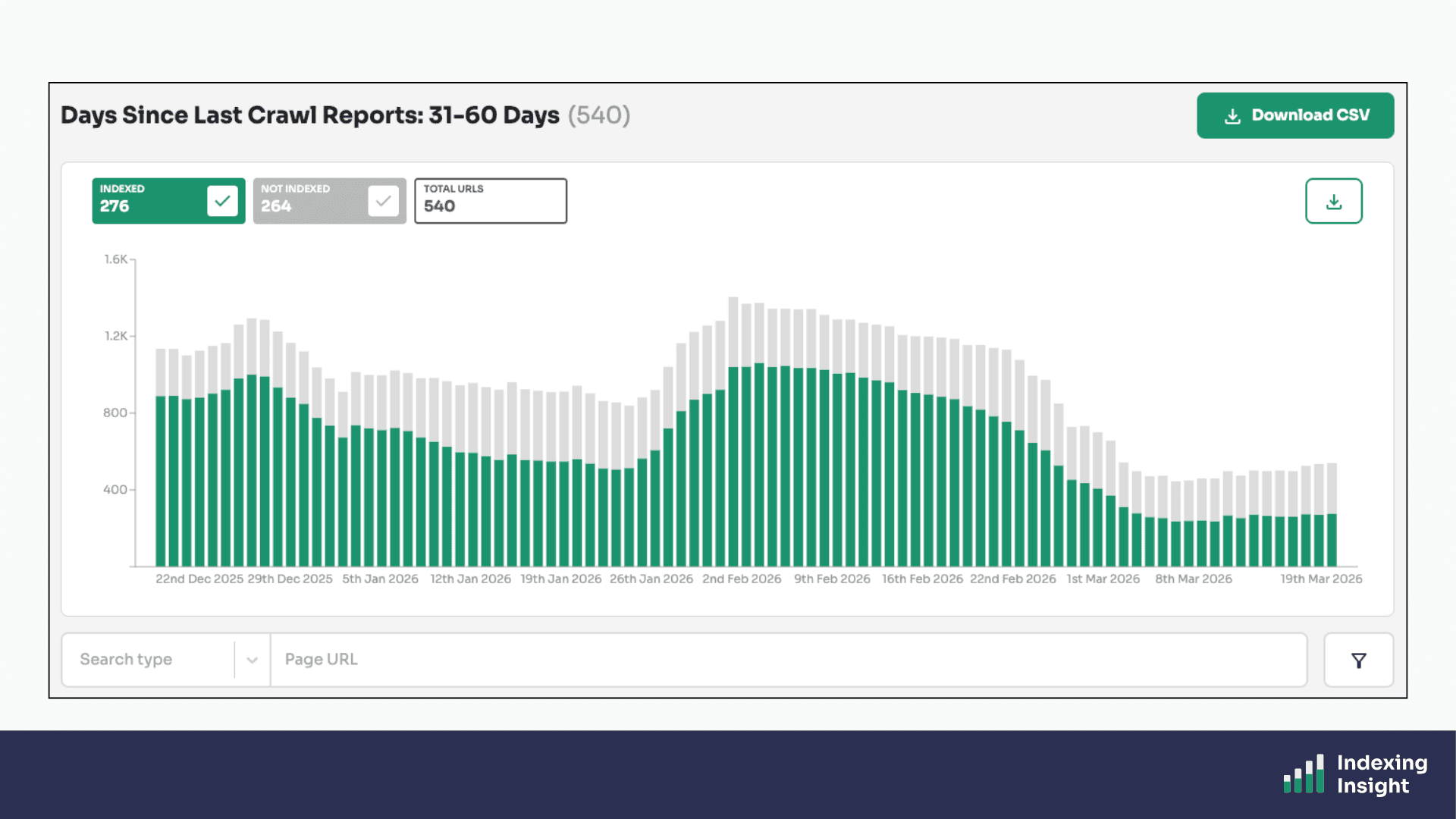
Identifying, for example, which pages are not indexed AND haven't been crawled in over 90 days, versus which are not indexed but still being actively crawled by Googlebot.
Plans: Available on Scale and Company plans.
Indexing Insight helps identify which indexed pages are going to be deindexed.
Our 130-day Indexing Rule research has identified that if a page has been recrawled in 130 days it has a 99% chance of being not indexed.
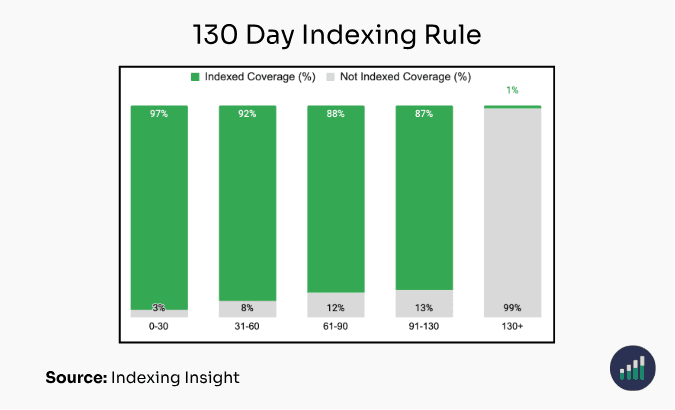
We’ve taken this research and fed it back into our product. Creating a 101 - 130 day crawl report that allows you to identify exactly which indexed pages are in danger of being deindexed.
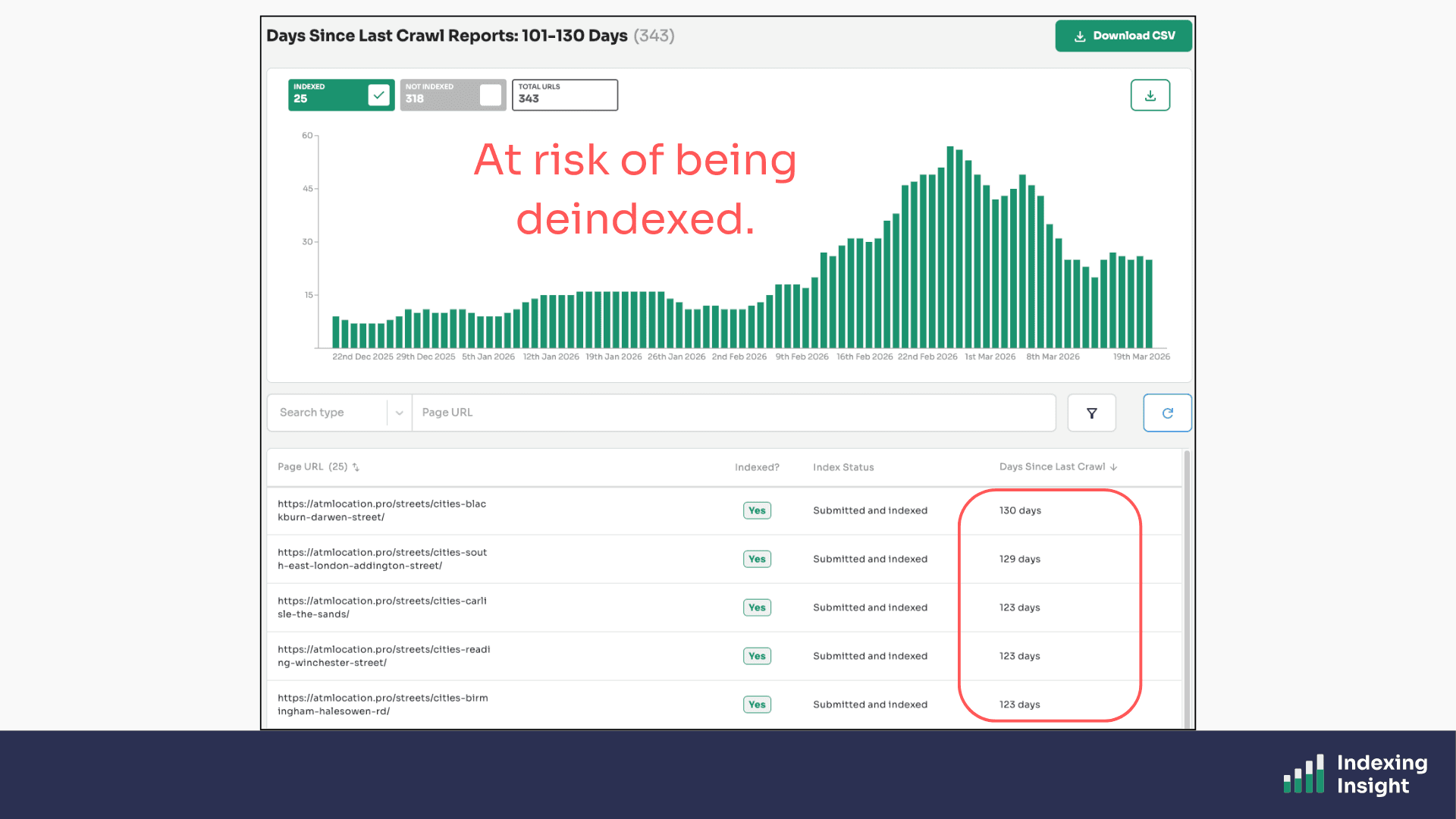
This unique report combines both crawl and indexing data to identify important pages of being deindexed, allowing SEO teams to prioritise fixes on pages before they get removed from the index entirely.
Plans: Available on Scale and Company plans.
Some pages don't simply get deindexed. They fluctuate.
Pages that sit near Google's quality threshold can move in and out of the index repeatedly. Indexed one week, not indexed the next, indexed again the week after.
This behaviour is almost invisible in Google Search Console because it only shows you the current state, not the pattern over time.
The Index Fluctuations report in Indexing Insight automatically identifies exactly which pages are jumping between Indexed and Not Indexed states.
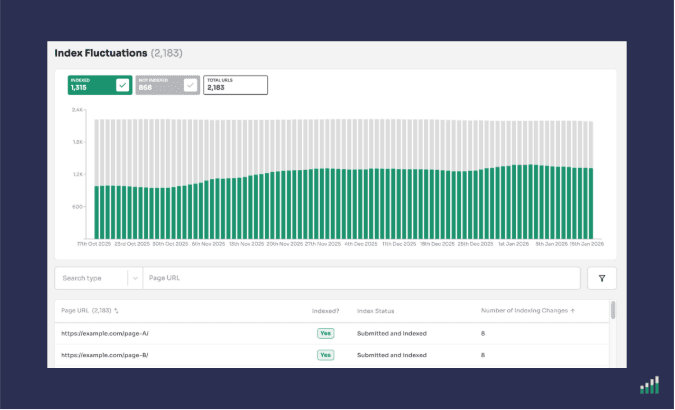
These are the pages sitting right on the edge of Google's quality threshold, pages that need targeted improvement to stay indexed consistently.
Understanding which pages are fluctuating is also incredibly useful for debugging traffic drops. A page that appears indexed when you check it might have been not indexed the week your traffic fell.
Plans: Available on all plans.
Indexing Insight has its own version of the URL Inspection Tool.
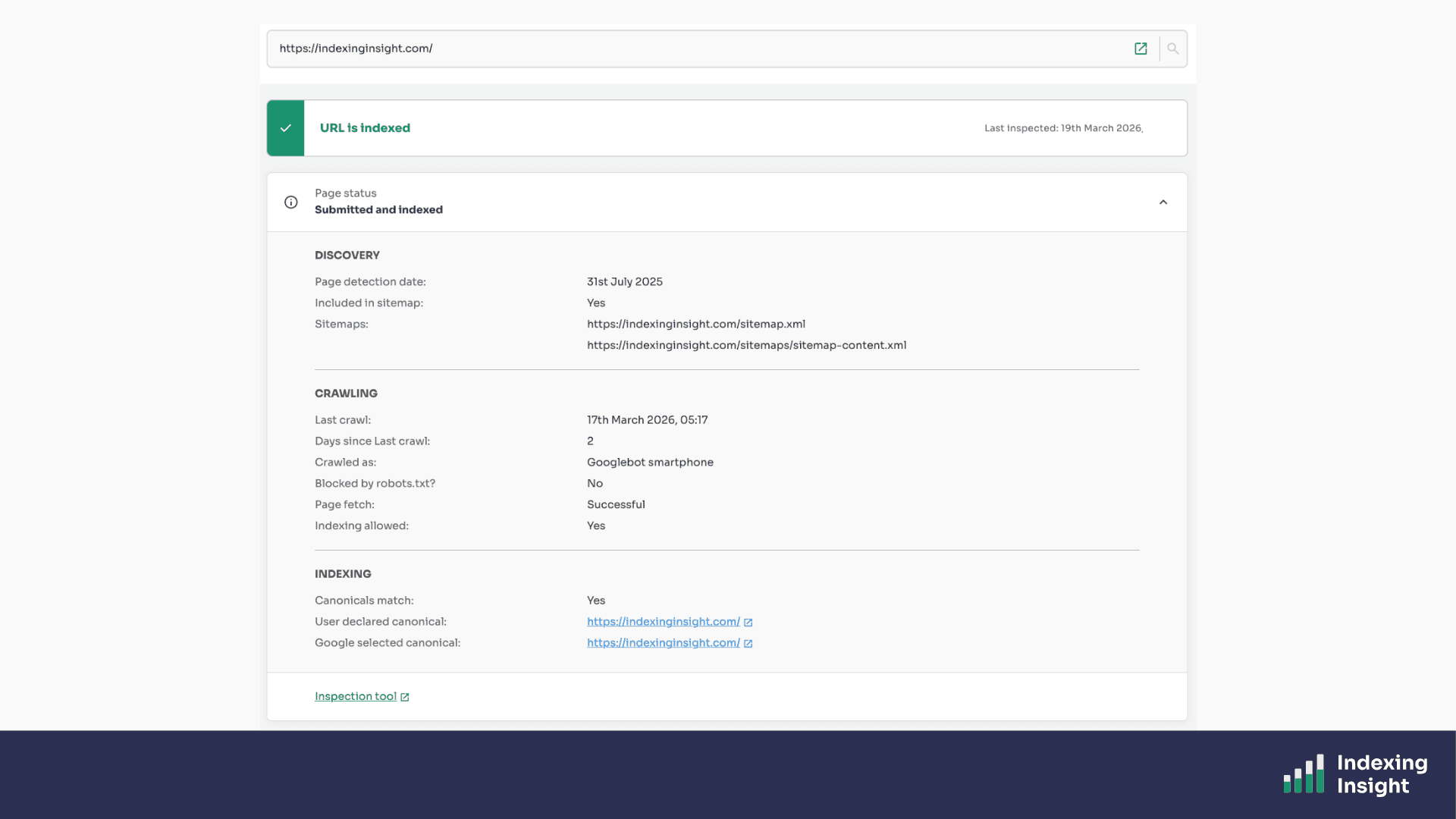
This report shows you the full set of indexing data for that specific page, including:
But we don’t stop there.
The URL report in Indexing Insight also captures both historic indexing data for each page.
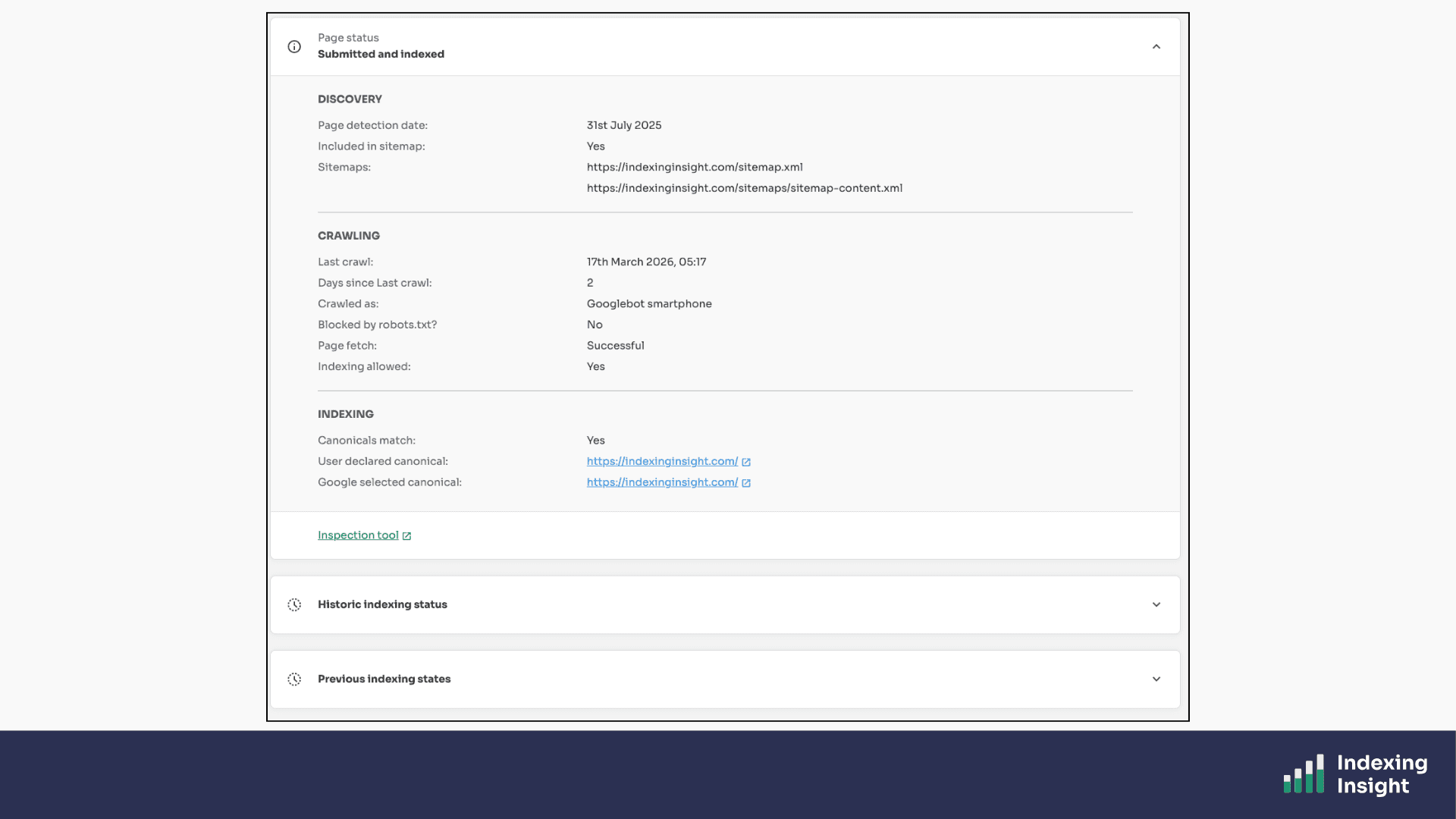
So you can do further analysis into why a page has been deindexed and get more context.
It's everything you'd want to know about how Google sees a page, all in one place.
Plans: Available on all plans.
One of the most requested and most valuable features in Indexing Insight is the historic indexing event tracking built into every URL report.
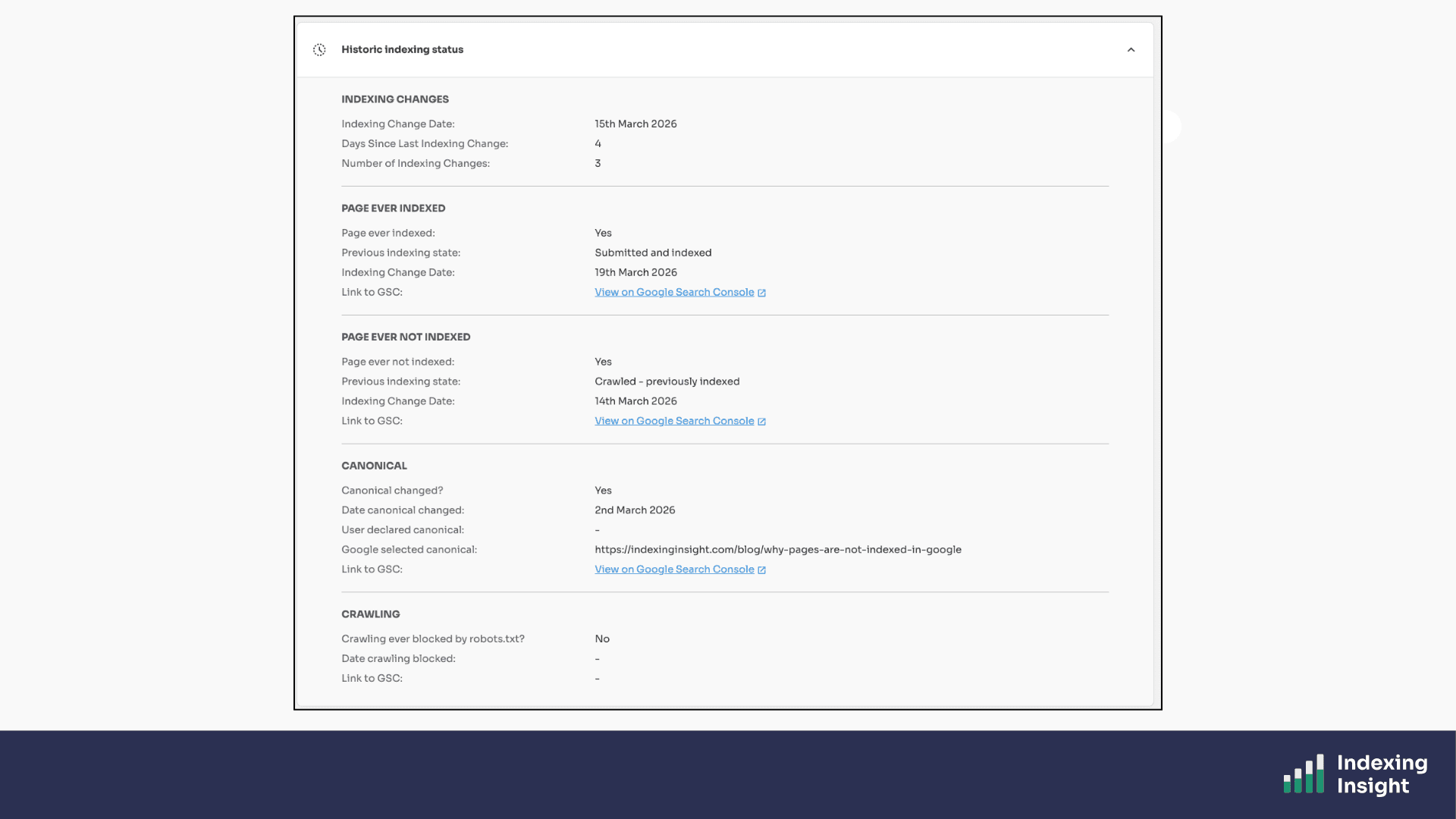
For every monitored page URL, we record five key historic events:
For each of these events, we also provide a direct link to the URL Inspection tool in Google Search Console so you can verify the historic state yourself.
Google Search Console gives you no historic record whatsoever. Every check in the URL Inspection tool shows you ONLY the current state.
Indexing Insight is the only place where you can see what actually happened to a page over time.
Plans: Available on all plans.
Indexing Insight monitor settings designed to put you in control.
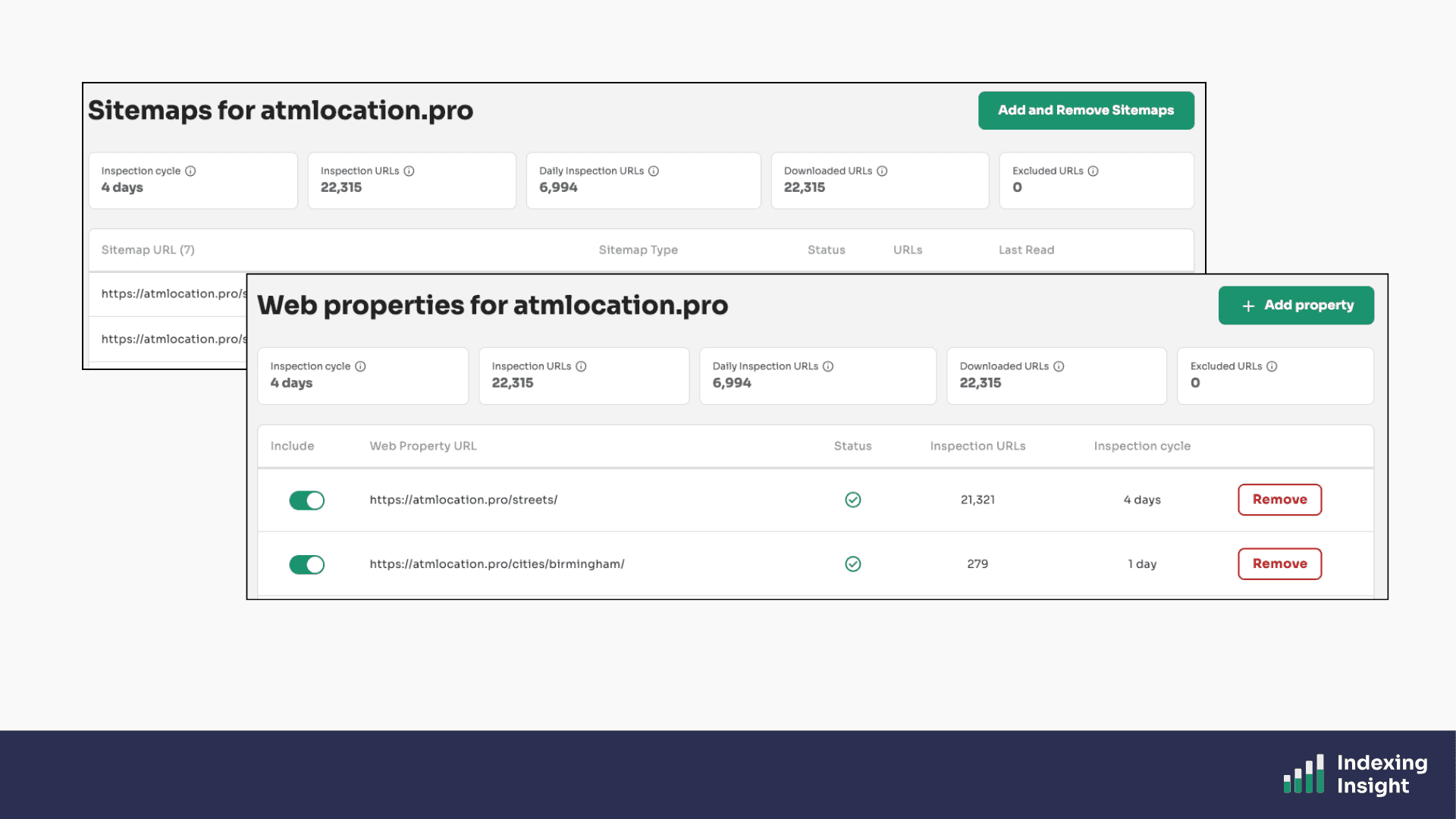
You choose which pages to monitor.
You choose which XML sitemaps to include.
You choose which web properties to add.
You can add or remove sitemaps and web properties at any time, and any changes take effect from the next scheduled inspection.
You're never locked into a specific configuration. As your website grows and changes, your monitoring setup can grow and change with it.
Plans: Available on all plans.
Indexing Insight offers a public API.
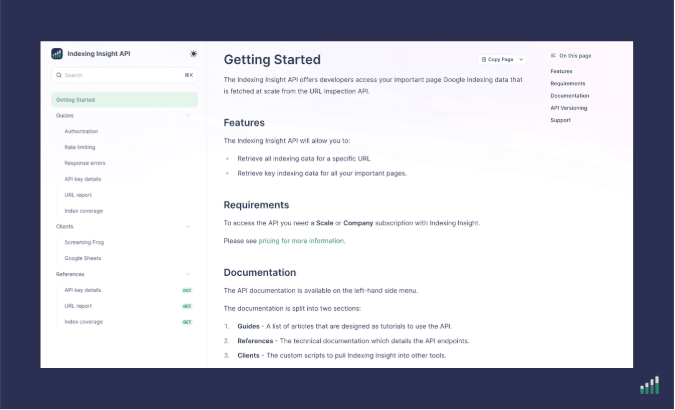
The API is for teams that want to integrate Google indexing data into their own workflows.
The API gives you access to two key data sources:
Both support filtering by segment, index summary, and coverage state.
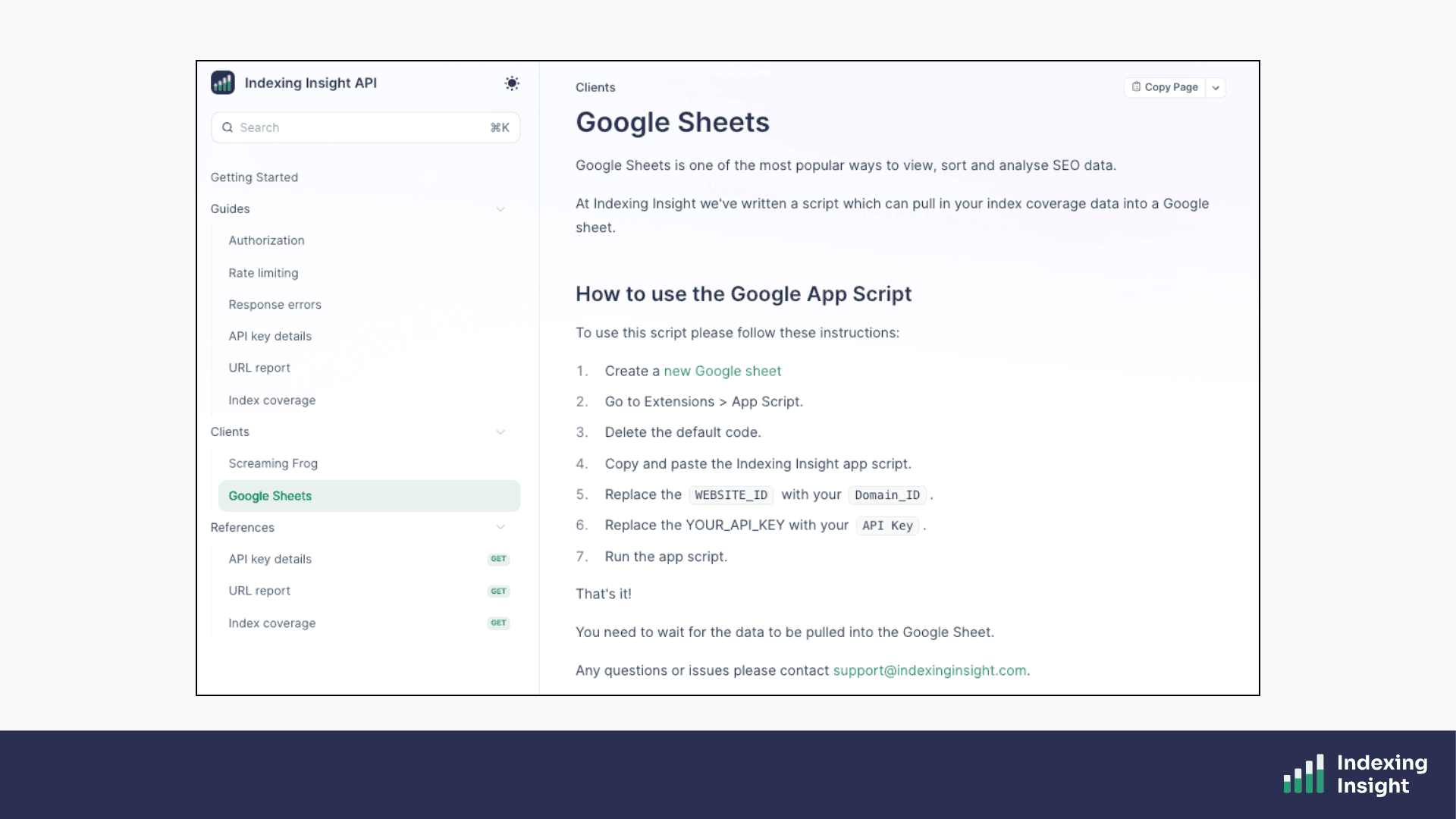
You can use the API to pull all your monitored indexing data into a database or Google Sheet, push page URL data into tools like Screaming Frog, or build indexing data into your own automated SEO reporting processes.
Pre-built clients are available for Screaming Frog and Google Sheets. The API is available on Scale and Company plans.
Plans: Available on Scale and Company plans.
Google Search Console is a great starting point for all SEO teams.
However, for large websites (100K up to 1 million pages), it simply doesn't give you enough.
The 23things listed above are things Indexing Insight can do that Google Search Console can't or that we do at a scale, speed, and depth of insight that no other tool can match.
From tracking active deindexing in real time, to overcoming the 2,000 URL API limit, to surfacing pages that Google has quietly forgotten.
Indexing Insight is built to give large-scale SEO teams the indexing visibility they need to protect and grow their organic traffic.

Adam Gent
SEO Product Manager and Technical SEO. I’m currently an independent consultant who works with organisations to plan, scope and execute SEO projects that drive results.
